This little blog gives news and tips on Android, iOS, Symbian and Windows Phone.
Wednesday, December 10, 2008
Buddycloud v.0.02.55 For Symbian 3rd
Buddycloud is an application for your mobile phone that lets your friends know what you are doing and where you are.
With Buddycloud you can “bookmark” the places where you like to hang out. As you move about on your daily business, Buddycloud automatically notices when you enter or leave a bookmarked place. This is instantly displayed on your friends’ phones and, optionally, published on your profile onFacebook or Twitter. Once at a place, you can comment on it by writing on its “wall” or simply read the comments left by others. With the built-in instant messaging you can chat with friends and people from all over the world. Buddycloud also provides a “nearby browser” where you can see and interact with people and places that happen to be near your current location.
Download
Buddycloud v.0.02.55 For Symbian 3rd
Monday, December 1, 2008
Foreca Weather v1.3.1 S60 3rd edition

You can choose from over 140.000 hand picked locations or you can retrieve forecasts for your current location using your phone’s GPS. You can also use the Landmarks in your phone or you can enter a new location by coordinates. ForecaWeather lets you display a 10-day forecast in your phone’s calendar as memos.
ForecaWeather features the following Foreca mobile produts:
- Current conditions
- Detailed forecast with 6h time
- steps-Long 10 day forecast
- Weather radar (North Europe and USA)
- Temperature forecast map
- Precipitation forecast map
- Symbol map
- Wind forecast map
- Cloudiness forecast map
- Satellite images
Click here to download a fully functional trial version of ForecaWeather.
Thursday, November 27, 2008
Jbak TaskMan 1.0 for S60

-Customisable quick launch, where you can add program, document, phone number, SMS and e-mail.
-List of all programs in your phone with quick search by name or UID.
-List of processes, threads, chunks with quick search.
-Quick and stable termination of busy tasks.
-Autorun of programms.
-Phone reboot.
-Uninstalling of sis-applications.
-Info about free memory.
-Clocks with seconds and date with day of week.
-Detailed information about runned task, which you can copy to clipboard.
-Quick task switch by pressing and holding menu-key (Smooth task switch)
Remember last-visited position in system phone menu.
-Detailed setting of menu-key
-Powerfull possibilities for power and memory saving
Tuesday, November 25, 2008
FlipSilent v1.0.6
Features
1, Flipover the phone to hangup or mute an incoming call!
2, Flipover to snooze or stop the alarm!
3, More power save, Stop the sensor ASAP!
4, Full control of switching between profiles, both flip over and flip back!
5, Auto Start with phone boots!
Phones Supported
It supports only phones (symbian s60 3rd) with an Accelerometer built in like N95, N95 8GB, N82
You need a Developer Certificate to sign the sis file in order to install it on your phone!
Download FlipSilent v1.0.6
Friday, November 21, 2008
Battery Manager v1.5 for Symbian S60 3rd Edition
Battery Manager v1.5 by KloNom is a program that manages your Battery. You want to save Battery Charge at the e.g. the last two remaining bars but you dont got the time to always look on your phone? Use Battery Manager! You can set simple Alerts, Profile or Bluetooth actions
Heres an example:
How to save Battery Charge after two remaining Bars:Open Battery Manager. Click Options->Settings->Profile actions.Select Change Profile at 2 Bars. At next menu select Change Profile to Offline. At last, just click Options->Start Battery-Managing. Then put it to Background and relax…
But thats just an example. You can set it to nearly all basic Profiles at any Battery State, be warned at a specific Battery State with Sound or switch on/off Bluetooth. You even can have multiple actions, like switch off Bluetooth at 3 Bars and change Profile at 1 Bar.You want to personalize your sound? No problem, just replace “C:\Battery-Manager\alert.wav” with any sound you want to.
Before installing Battery Manager, install “xprofile_3rd_110_unsigned.SIS” & “blues_3rd_1_0_0_unsigned.SIS” to your phone memory, both attached in this Download! Then install “BatteryManager_v1_5_0_unsigned.sis” also to your phone memory.
Additional Notes:-
Bluetooth actions only possible with CapsOff!-All files are unsigned.-Have Python installed.
Download:
Battery Manager v1.5
Sunday, November 2, 2008
MobiMonster 2.0
Travel Services : MobiMonster provides access to a worldwide database of Airlines, Hotels and Car rental companies. This service is enabled free of charge and the user can use them at no cost on the mobile device (Symbian and Windows Mobile) .
Download :
Saturday, November 1, 2008
Efficasoft GPS Utilities for Symbian v1.3.0

Designed GPS information overview.
Free image map real-time navigation. (Advanced caching technology supports fast map operation & ULTRA LARGE map image)
“Go To” function - define your destinations and be guided all the way with distance, TTA, direction guider, proximity alert…
World map view navigation with free-scale zooming.
Digital speedometer & customizable speed alarms.
Two-mode digital compass with dest. information display.
New! Google KML, GPX, CSV format track logger & trip statistics.
Waypoint & POI Manager + 30+ pre-defined POI icons.
Night view mode, fast 0~7 view switch.
Advanced smooth animation effects.
Advanced “5 Sec. Average” and “Kalman Filter” processors for high precision navigation.
Supports built-in & Bluetooth NMEA0183 GPS receivers. Auto detects Bluetooth GPS receiver.
Compatible Phones
Download :
Thursday, August 28, 2008
Nokia N79 vs Nokia N85 vs Nokia N96 [Three 5 mpx camera phones]
Successor of the N95, the N96 is dual-slider with both numeric keypad and one for multimedia control. It still has 5-megapixel camera, but now is with 2.8″ display, 16GB of memory plus microSD slot and DVB-H for digital TV. It is Symbian S60 Feature Pack 2 smartphone with WiFi, GPS, quad-band GSM support and dual-band UMTS.
Nokia N85 is a two-way slider, revealing either a numeric keypad or music shortcuts, depending on the way it is opened. It is a Symbian S60 smartphone with 2.6” OLED display, 5-megapixel camera with Carl Zeiss lens and N-Gage gaming platform. For music it has 3.5mm jack, stereo speakers, stereo Bluetooth, FM transmitter and radio.
Nokia N79 is a multimedia phone with 5-megapixel camera, N-Gage gaming platform, 3.5mm jack, stereo speakers, stereo Bluetooth, FM transmitter and radio. It is a Symbian S60 smartphone with 2.4” display showing up to 16 million colors.
Babi: Aurora theme
The Babi Gallery
Facebook Theme for Symbian Phones
Main
Wednesday, May 14, 2008
After CallAfterCall for Series 60-3 released: convenient call list with quick access to needed actions
| Released: 30.04.2008 Version: 1.0 File Size: 227 Kb |
General information
AfterCall application performs various actions after call ends. You can quickly send SMS, MMS or E-mail messages right after your call. Without unnecessary movements you can make a new note, calendar meeting or task.
If you get a call from a new number, you can add this number to your contact list or update existing contact info right after the conversation, without entering the call list once again.
Right after the call you will view the call information: the exact call duration, the exact number from which the conversation was made, and the time of calling.
Application main window consists of the calls list. Unlike the Nokia native callers list, here all calls are displayed, even if they were made from the same number. So you can see exactly how many times and when somebody called you and from which exactly number the incoming/outgoing call was made. This is very convenient for the case if a contact entry consists of many numbers.
Key Features:
- Quick access to most used actions after a conversation ends
- Exact call info with the callers number always displayed
- Possibility to call back or send a message right after call end
- Possibility to create a calendar entry after the call
- Activation on selected types of calls: Incoming, Outgoing, Missed, Rejected, Busy calls
- Activation only on unknown (not listed in the contacts) numbers possible.
With AfterCall for Series 60.3 user is able to add new numbers to the contact list or to assign a meeting, to send the SMS/MMS message to the number
which was just calling right after the call.
After conversation ends, AfterCall shows a special window with quick access to calendar, messaging and contacts database. Furthermore, all call
information is shown right after the call.
Main application screen shows calls list, but in a bit different way then the native Nokia call list: all events are shown in the order they
have occurred. Exact number of the event is always shown. This allows easier call and number management.
AfterCall can be activated on different types of calls and its setup is very easy.
The trial version is limited for 10 days. A license code based on IMEI is provided upon purchase.
Languages:
AfterCall software is available in English, German, Russian and Ukrainian languages
Support:
We will be glad to support you at support(at)symbianguru.com if you have any questions or concerns. We are always glad to hear from you!
Compatible with Other, Nokia 5500, Nokia E50, Nokia E61, Nokia E62, Nokia E70, Nokia N71, Nokia N73, Nokia N75, Nokia N80, Nokia N91, Nokia N92, Nokia N93, Nokia N95, Nokia 3250, Nokia N Series, Nokia E Series, Nokia E65, Nokia N76, Nokia E61i, Nokia N73 Music Edition, Nokia N77, Nokia E90, Nokia 6120, Nokia 5700, Nokia 6110 Navigator, LG KS 10, Nokia E51, Nokia N81, Nokia 6121, Samsung SGH-i400, Samsung SGH-i520, Nokia N82, Nokia N93i, Nokia 6290, Samsung SGH-i560, Samsung SGH-i450, Nokia N95 8GB, Nokia N81 8GB, Nokia N91 8 GB, Nokia N96, Nokia 6210 Navigator, Nokia 6220 Classic, Samsung G810, Nokia N78
Saturday, April 12, 2008
Spotted: Nokia's S60 V3 FP2 -the N82
Nokia N82. In Black. The convergence of GPS, photography, video and the web has changed the way you experience your world. Discover new places with integrated GPS, ... you know the rest!
Images Courtesy Plemix.
Friday, April 4, 2008
Nokias Text Messnger
Key changes include:
- Installation available also on non-English operating systems
- Corrected bug: If device was connected in Non PC Suite Compatible mode (i.e. MassStorage), it crashed the sidebar. Now it doesn't.
Note: When updating the existing version of Nokia Text Messenger, please reboot the PC after the installation, as is instructed in the installation program. If this is not done, application does not find the device.
Vista Users Download here. It isn't available yet for the other operating systems. Wonder why? We are still the majority! :(
Friday, March 28, 2008
Currencies – mobile currency converter with real time exchange rates
Symbian Guru released the new software Currencies – mobile currencies converter with real time exchange rates from the Central Bank and your own currencies rates set manually.
Currencies gets real time exchange rates from European Central Bank directly to your mobile. You only have to activate the GPRS connection.There are two types of currencies: the predefined list of most used world currencies and list of your own currencies, which rates you can set manually. You can set the exchange rates of your currency to one of the main currencies and to save it.
There is an auto refresh option available: you can update all the rates instantly by pressing the menu Option – Update rates.
Currency conversion is made easily: you just set the initial and final currency as well as amount. There is unlimited amount of currencies that you may convert with Currencies application. The result you will receive immediately after entering the initial data.
Key Features:
• Real time exchange rates data
• All data overview with one click on your mobile
• Ability to add your own currencies as well as their rates
• Ability to convert unlimited amount of currenciesMore info as well as pdf user manual for
Currencies can be found on http://www.symbianguru.com.
Thursday, March 27, 2008
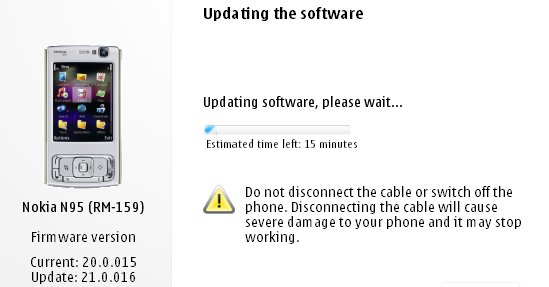
N95 gets yet another FW update!
What's new for v21.0.016 (over and above v20 firmware):
- Flash Lite 3 is included, so Flash video sites will work, including YouTube (just as on the N95 8GB v15 firmware from a couple of months ago)
- The Web runtime is included, meaning that standalone widgets are now possible
- Greater Bluetooth headset compatibility
- Better handling of entering lots of text into web page dialogs
- Speedier Gallery in every way
- Faster Java runtime, so Java apps start faster
- plus the usual miscellaneous bug fixes and tweaks, no doubt!
Ofcourse they still haven't included the full app of the NGage service, so I guess we ain't going to see it in the near future(even though release had been slated for X'mas '07).
More details and screens at AllAboutSymbian.
Saturday, March 22, 2008
Ghoulish views on an N95
Get a load of this!
It seems some of the ghouls over at Tech from the Deep have a taken a fancy to theN95 processing power of late and they seem to have had a great time blogging about it too!
It’s not everyday that you get to see techy things and gadget stuff from a ghouls perspective. Makes for a nice read, being that it’s given from a different perspective - if you know what I mean
Go here to read about Nokia’s Multi-Headed ComputerDarkest tech/gadget news as well as deadliest computer stuff - overclocking,tweaking,etc brought to you by our very own ghouls...[evil laugh]