Showing posts with label Symbian software. Show all posts

Sunday, May 11, 2008

Leaked pictures of sony ericsson P5 (Paris)

To be honest, in the beginning I had some doubts about its reality. I thought that it was yet another fake (There were too many P5 fakes :) ) But more and more pictures of "Paris" are coming from various sources, so I guess I was wrong.


This smartphone from Sony Ericsson - Sony Ericsson P5 runs recently announced Symbian UIQ 3.3.The form-factor of this device is "Slider" and it's made from metal and mirror-like front panel. Handset is equipped with a full QWERTY keyboard and features W-LAN 802.11b/g, built-in GPS (With preinstalled Google Maps) and 5MP digital camera with auto focus.Phone also supports 3G networks, Bluetooth and USB 2.0 cable connectivity...its obviously touchscreen.

5.0 MEGAPIXEL CAMERA


M2 CARD SLOT


SLIDER FACILITY


Now what do you feel...is this 1 real or fake????

If you still think this one is fake check the below listed sites for more details...

"Courtesy mobireviews"
s603rd.blogspot.com
se.blogvasion.com
gsmarena.com

Saturday, May 10, 2008

Symbian UIQ 3.3 User Interface

Here we got some pictures of the upcoming Symbian UIQ 3.3 user interface...


liked it???

Friday, April 4, 2008

AutoTheme v.1.0 for S60 v3 released: theme changer for your mobile

Symbian Guru released AutoThemes application for Series 60.3. AutoTheme is a cute theme scheduler for Nokia Smartphones. Application changes themes automatically, according to the active profile or user defined time schedule.
AutoThemes allows creating two types of rules: time based rule and profile based ones. Nokia theme can be changed at exact time, or can be changed when certain profile is activated.
Theme changer rules are totally adjustable, with ability to activate or deactivate the rule with one key pressing, edit time or condition of theme change.
Theme change is performed smoothly and silently, without phone reboot or any other interaction.

Key Features:

- Two types of rules for theme change: profile based and time based
- Theme change performed smoothly and silently, without mobile reboot
- Easy to use and friendly interface, easy rule creation
- Quick rule deactivation with only one key pressing
- Multilanguage support: English, German, French, Italian, Russian, Ukrainian


More info as well as pdf user manual for AutoThemes can be found on http://www.symbianguru.com.

Nokias Text Messnger

textmessenger.png

Key changes include:

  • Installation available also on non-English operating systems
  • Corrected bug: If device was connected in Non PC Suite Compatible mode (i.e. MassStorage), it crashed the sidebar. Now it doesn't.

Note: When updating the existing version of Nokia Text Messenger, please reboot the PC after the installation, as is instructed in the installation program. If this is not done, application does not find the device.

Vista Users Download here. It isn't available yet for the other operating systems. Wonder why? We are still the majority! :(

Friday, March 28, 2008

Currencies – mobile currency converter with real time exchange rates

Symbian Guru released the new software Currencies – mobile currencies converter with real time exchange rates from the Central Bank and your own currencies rates set manually.

Currencies gets real time exchange rates from European Central Bank directly to your mobile. You only have to activate the GPRS connection.There are two types of currencies: the predefined list of most used world currencies and list of your own currencies, which rates you can set manually. You can set the exchange rates of your currency to one of the main currencies and to save it.

There is an auto refresh option available: you can update all the rates instantly by pressing the menu Option – Update rates.

Currency conversion is made easily: you just set the initial and final currency as well as amount. There is unlimited amount of currencies that you may convert with Currencies application. The result you will receive immediately after entering the initial data.

Key Features:

• Real time exchange rates data

All data overview with one click on your mobile

• Ability to add your own currencies as well as their rates

• Ability to convert unlimited amount of currenciesMore info as well as pdf user manual for

Currencies can be found on http://www.symbianguru.com.

Thursday, March 27, 2008

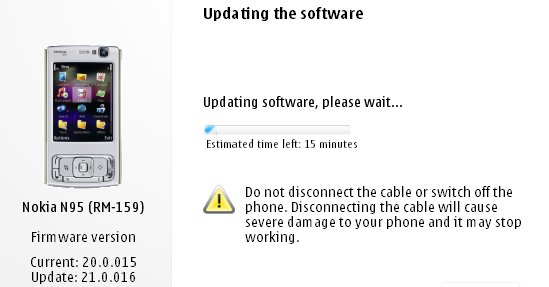
N95 gets yet another FW update!

After much waiting it seems Nokia has at last given the Nokia N95 its Flash Lite 3/Web runtime firmware update. Ofcourse we alrady got the utility wares for seeing youtube videos through alternate updates, atleast it's Betterlate than never. It's nowhere near as huge an update as the v20 which introduced demand paging and transformed the performance of the device turning the lowly N95 into as powerfull a machine as the N95 8GB especially with the 16 GB microSD that has since been released. The v21.0.016 is still a major firmware and well worth installing, but i wouldn't recommend it if you are fed up of the Backup&Restore formality.

What's new for v21.0.016 (over and above v20 firmware):

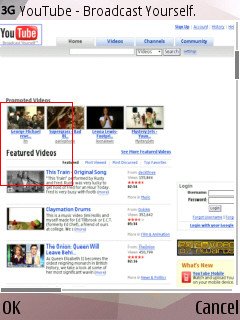
  • Flash Lite 3 is included, so Flash video sites will work, including YouTube (just as on the N95 8GB v15 firmware from a couple of months ago)
  • The Web runtime is included, meaning that standalone widgets are now possible
  • Greater Bluetooth headset compatibility
  • Better handling of entering lots of text into web page dialogs
  • Speedier Gallery in every way
  • Faster Java runtime, so Java apps start faster
  • plus the usual miscellaneous bug fixes and tweaks, no doubt!

Ofcourse they still haven't included the full app of the NGage service, so I guess we ain't going to see it in the near future(even though release had been slated for X'mas '07).

More details and screens at
AllAboutSymbian.

Friday, March 7, 2008

Mining for lost SMS messages?

If you by chance happened to delete your messages, and feel like reading them again, then here's what Kishore from mynokiamobile.blogspot.com says you gotta do:

To do this you need to have FExplorer on your Nokia Phone. (or click on the link)

  1. Open FExplorer.
  2. Select drive C: or D: depending on the memory in which the SMS messages have been saved.
  3. In my case I selected C: , Then open "system" folder. Then in the "system" folder open "mail" folder. Then in this folder u will see different folders (eg 0010001_s) and certain files (eg 00100000). These files are the actually messages.
  4. Browse through each folder and chack for the file till u get the one that you are looking for.( a very tiring process..Zzzzzzzzzz)
  5. For opening the files don't choose options>file>open as it will show format not supported rather choose options>file>hex/text viewer. By selecting the "Hex/ text viewer" you ll be able to open and read the deleted SMS message.
Have a great time mining though your collections! ;)

Tuesday, March 4, 2008

BT Guard v.2.0 for Series 60.3 released: secures your phone from unauthorized access

Symbian Guru released the update version of BT Guard software– the security software which helps to protect the phone from unauthorized access viaBluetooth. Now the application has Active Connection Guard build in, so you will not be bothered when using a BT Headset, but the app will turn your BTOff when you stop using it.BT Guard changes your Bluetooth status automatically, making your phone invulnerable and saves your battery life. BT Guard changes Bluetooth statusautomatically according to your settings. When it is time to change your Bluetooth status the application can ask you for confirmation to turn it invisible or off.Also if you are receiving or sending some data you can set the software in that way that it will not bother you.More info as well as pdf user manual for BT Guard can be found on http://www.symbianguru.com.

The Pundit Report

Search Me