Showing posts with label 3rd edition. Show all posts

Sunday, December 21, 2008

Symbian s60 v3 Themes !

Get your free Nokia themes below!

If you are having problems with themes please read the following posts before asking questions: "certificate error" and "expired certificate"


WMP SKiN
Guess what guys!! A kool guy has designed a skin for Windows Media Player based on our beloved NokiaN95,chek it out..it really is cool and the perfekt addition for the Windows Media Player driver that the
computer comes bundled with. Really nice I must say - kinda like a virtual n95.

=>N95 SKiN<=


N95 theme
This here is a theme put forward by Zach of Symbian In Motion- a blog about our beloved Symbian OS. It's a real cool theme and i absolutely love it, pretty stunning too.Chek it out..
=>DOWNLOAD<=

i95 Theme ;)

This theme caters to those of you who do not plan to go for a iphone but yet like it's feel. Get urself ur very own iphone theme, just make sure you don't let anyone drool right over your phone ;)
To download it from your PC, click here

CLick on the title to download the theme..
Purple bouque
Very rich colouring!

Mac Apple

The cool elegance of a mac,,

Black&Orange

It's a wow theme!
Smiley
Ain't they cute? :)

Cool Reaper

This guy is definitely cool!
Another Green theme
I seem to have a hidden penchant for green..

No Fear

Have no fear, it works..
Macintosh

Cool as usual..
Cool Reaper with a difference
This reaper is froma different era!
Windows XP emulator theme

Wind (default icons) by ICEman
(also available with customized icons)

Nseries 4 by ICEman
Nokia Abstract Style by ICEman
Abstract5 (default icons) By PTWS
(also available with customized icons)
Abstract7 (default icon) By PTWS
(also available with customized icons)
Extra themes: --> CLick here !
Hope you all enjoyed these themes,, there'll be more to come and I'll be glad if you can donate some of them yourself! :)

Most of these themes are compatible for the
N95, N78, N96, N76, N82, n81, E50 , E51 , E60 , E61E61i , E62 , e65 , E70 , E90.

Saturday, December 20, 2008

Top Softwares to Beef up ur S60 v3 phone with!


₪ SymbianPileUp - Beef iT! ₪

Respected Netizens of Symbia, I bring to you the master,
the kinglist of all freeware applications, tested for you to use, with a new edition of our Beef iT! applications section and this time it's bigger than ever!!

CLick here to get them!

Wednesday, October 8, 2008

Did u Know?? i sure didn't..

The guys at Yeigo’s blog has rounded-up ten nice 'lil things that you didn’t know about Nokia (neither did i until i read this). The last one is sure to touch a chord for nature lovers..
1) The ringtone “Nokia tune” is actually based on a 19th century guitar work named “Gran Vals” by Spanish musician Francisco Tárrega. The Nokia Tune was originally named “Grande Valse” on Nokia phones but was changed to “Nokia Tune” around 1998 when it became so well known that people referred to it as the “Nokia Tune.”
2) The world’s first commercial GSM call was made in 1991 in Helsinki over a Nokia-supplied network, by Prime Minister of Finland Harri Holkeri, using a Nokia phone.
3) Nokia is currently the world’s largest digital camera manufacturer, as the sales of its camera-equipped mobile phones have exceeded those of any conventional camera manufacturer.
4) The “Special” tone available to users of Nokia phones when receiving SMS (text messages) is actually Morse code for “SMS”. Similarly, the “Ascending” SMS tone is Morse code for “Connecting People,” Nokia’s slogan. The “Standard” SMS tone is Morse code for “M” (Message).
5) The Nokia corporate font (typeface) is the AgfaMonotype Nokia Sans font, originally designed by Eric Spiekermann. Its mobile phone User’s Guides Nokia mostly used the Agfa Rotis Sans font.
6) In Asia, the digit 4 never appears in any Nokia handset model number, because 4 is considered unlucky in many parts of Southeast/East Asia.
7) Nokia was listed as the 20th most admirable company worldwide in Fortune’s list of 2006 (1st in network communications, 4th non-US company).
8. Unlike other modern day handsets, Nokia phones do not automatically start the call timer when the call is connected, but start it when the call is initiated. (Except for Series 60 based handsets like the Nokia 6600)
9) Nokia is sometimes called aikon (Nokia backwards) by non-Nokia mobile phone users and by mobile software developers, because “aikon” is used in various SDK software packages, including Nokia’s own Symbian S60 SDK.
10) The name of the town of Nokia originated from the river which flowed through the town. The river itself, Nokianvirta, was named after the old Finnish word originally meaning sable, later pine marten. A species of this small, black-furred predatory animal was once found in the region, but it is now extinct.
11) They also used to be a Rubber Boot manufacturer before they entered the wireless phone buisiness! Chek dis!! Courtesy Neon.
You know what? When i read things like this about a company it makes me see the company in a more humane perspective. It changed my view of the company to something that we can all associate with.. well sort of...

Friday, July 11, 2008

Things that went unnoticed..


Guess there's more to a Series 60 V3 phone than meets the eye.
Only recently did I come to know about the great alarm feature
and a way to disconnect GPRS instantly on our Nokia N95, the N95 8 Gb and the n95 NAM.

The Alarm Feature

You can put up numerous alarms on the phone simultaneously, each of
which can be scheduled to ring-up on working days, week days -
practically whenever you feel like it. The previous Symbian versions
required certain 3rd party apps for these functions to be used -
really sad considering that we're talking about the so-called
smart phones here. The S60 3rd Edition phone also has another feature
worth noting: The alarm will wake you up even if the phone's been
switched off! What's more, it will even ask you whether it can switch
itself on now that you are awake so that it can continue to help you
around..such a helpful dude huh? :)

Fast Disconnect

The GPRS connection can be hung up just as you disconnect regular
voice calls by pressing the Hang-Up button for 2 secs. Upon doing this
it will ask for a confirmation - it comes in handy when you're
entering areas wherein the data charges are sky high, or for any other
reason that you can think of.

If you guys have uncovered something else that you'd like other people
to know feel free to comment about
it here.
Don't forget to check out the Xploit TiPs Here!

Thursday, May 22, 2008

NFS : Pro Street on ur N95

Need for Speed: ProStreet will take the Need for Speed series in a new direction of gameplay. Instead of an arcade style of gameplay which has dominated the series, ProStreet will focus much more on realism and move closer to, but not into, racing simulation, and still with options to use driving assistants to make driving easier and more arcade-like. Unlike its predecessors, all racing in ProStreet will take place on closed tracks, thus making it the first game in the series not animating illegal racing behaviour since Need for Speed: Porsche Unleashed, hence there will not be any police in the game. Performance tuning will take up a large part of gameplay in a way that even a small adjustment of the shape of a car's body will impact its performance.
That was what wikipedia had to say about the NFS : Pro Street on your PC. The mobile version on the other hand has great graphics for a phone game and includes performance tuning too but to a limited extent. But all in all it's a great game to kill time on your morning commute or while on the subway.. just make sure you show-up for whatever you were travelling for instead staying hooked up onto the phone ;) The game features both a Quick race for gettin' the feel and a full-fledged Career mode in which you start with an old fashioned Toyota Corolla(1987 model i 'zink) and then you can earn money and upgrade to even a Nissan CT-R Prototype car or the good lookin' BMW M3 E92!!

Earn money either by winning race purses or by awesome drifting - which is easy provided u get the drift (pun intended ;) )

The tracks in the game are aplenty, and with all the Slipstreaming, "good lane" and drifting techniques to be learnt it'll keep you busy for a long time..just keep to the center of the drift bar or you could end up as road kill !

One of the good things i noted about the game is that unlike it's PC version the mobile version doesn't hog the system resources of the phone, a boon for N95 users. In fact it only takes about 7MB of RAM !

Here are some pics of the game:
The car..
The race..
The drift..

Whoops!
damn...

Tuesday, May 20, 2008

PanoMan 3.0


PanoMan 3.0 comes in landscape mode with a preview area on the screen displaying the panoramic image captured so far as well as a small info area showing the frame resolution and the number of frames captured/available.

Due to the improvements made in heap consumption, you can capture up to 12 frames within one session, creating eye-popping up to 360° images with up to 32 Megapixel (on e.g. N95 8GB; maximum resolution on other devices might be actually lower).

Download!

Tuesday, April 22, 2008

The TIPings and the TRICKings..


These are some information that will help you find some cool information on your Nokia Nseries & Eseries phone..

Use these codes from the main screen:

If you want your factory settings restored press: *#7780#
Want to get rid of that very annoying operator logo try: *#67705646#
To track down the address of your Bluetooth device press: *#2820#
See what the SIM clock status is: *#746085685#


Locate your phone’s unique International Mobile Equipment Identity: *#06#
Information you get from the IMEI:
XXXXXX XX XXXXXX X
TAC FAC SNR SP


TAC = Type approval code
FAC = Final assembly code
SNR = Serial number
SP = Spare


Double check the call waiting status of your phone: *#43#
Try to reset phone timers and game scores: *#73#
View private number (little suspicious of this): *#30#


To show software version: *#0000#
Information you get from the Software revision-
V 20.00.31
18-02-08
NSE-3

1ST Line = Software revision
2ND Line = The date of the software release
3RD Line = Phone type


To activate the Half Rate Codex and double capacity for voice traffic: *#4720#
In order to deactivate it: *#4720*
Activate Enhanced Full Rate Codec for maximized sound quality: *3370#
Deactivate and add approximately 5% more talk time: #3370#
Check number where “On No Reply” calls are diverting: *#61#
See manufactures code: *#7760#
Check out the Provider Lock Status: #pw+1234567890+1#
The Network Lock Status: #pw+1234567890+2#
Country Lock Status: #pw+1234567890+3#
And SIM Card Lock Status: #pw+1234567890+4#

Additionally, entering “*#92702689#” brings up a subdirectory that displays the serial number, date made, purchase date, date of last repair (if applicable), and transfer user data.


Clock Stopping:
To check weather your SIM Card supports clock stopping type-
*#746025625# (*#SIM0CLOCK#)
Revealing the Headphone and Car-Kit menus:
Please note that if you do these next tricks, the new menus can't be erased without retoring the factory default settings. To do these tricks you need to short-circuit the pins on the bottom of the phone next to where you plug in you charger.

1. To activate the "Headset" menu, you need to short-circuit pins "3" and "4". After a short time the word "Headset" will be shown in the display. Menu 3-6 is now enabled.
2. To activate the "Car" menu, you need to short-circuit pins "4" and "5". After a short time the word "Car" will be shown in the display. Menu 3-7 is now enabled.

THE REBOOT TRICK
This should work on all software versions of the 6110.
1. Go to the Calendar (Menu-8)
2. Make a note or reminder.
3. Enter some text into the edit box.
4. Hold "Clear" until the whole text is cleared, then press "Back".
5. Press "0". The main screen will now be showing but a space appears on the screen. (you can't see it)
6. Enter 4 digits (e.g. 1234).
7. Use the down arrow to move the cursor to the left side of the numbers and the space (Down arrow twice).
8. Now enter 6 digits and press the call button.

Wait for a few seconds, the screen should start to flash and reboots. It should alsowork on other menus like the "Profiles" menu.

EFR CALL QUALITY
To activate EFR (Enhanced Full Rate) Enter the code-
*3370#
This improves call quality but decreases batterylife by about 5%
To deactivate it, Enter the code-
#3370#

THE JAMES BOND TRICK
If you short-circuit theleft middle and right pins on the bottom of the phone with all connections touching each other, the Nokia software hangs! The profile "Headset" will be activated. Before you do this just activate the "Automatic Answer" in the headset profile and set the ringing volume to "Mute". Now you can use your phone for checking out what people are talking about in a room. Just place it under a table in a room and call it. The phone receives the call without ringing and you can listen to what people are saying.

NETWORK MONITOR
There is a hidden menu inside your Nokia phone. If you want to activate it, you'll have to re-program some chips inside of your phone.
Check your software version. You can only continue if you have v4.33, v4.73 or v5.24.
Take apart the phone.
De-solder the EEPROM (ATMEL AT 24C64).
Read out the data with an EEPROM programmer and save it to a file (Backup).
If you have v.33 or v4.73, change the address "03B8" from "00" to "FF".
If you have v5.24 then change the address "0378" from "00" to "FF".
Write the new data to the EEPROM and solder it back to the phone,
Power on your phone and you should have "Netmonitor" enabled.
The Network Monitor gives you the following information.

Carrier number
MS RX Level in DBM
Received signal quality
MS TX power level
C1 (Path loss criterion, used for cell selection and reselection). The range is -99 to 99.
RTL (Radio link timeout).
Timeslot
Indication of the transmitter status
Information on the Network parameters.
TMSI (Temporary Mobile Subscriber Identity).
Cell identification (Cell ID, Number of cells being used).
MCC (Mobile country code)
MCN (Mobile network code)
LAC (Location area code)
Ciphering (On/Off)
Hopping (On/Off)
DTX (On/Off)
Discard cell barred information

CHECK SIM-LOCK
If you bought your Nokia on UK Vodafone or UK Cellnet you do not need to check this because they both transmit on GSM900, and they don't usually lock the phones. However if you bought your phone on UK Orange or UK One2one your phone may be blocked. The reason is that they both transmitt on GSM1800. To make a call on GSM1800 you need what is known as a "Dual band" phone. A dual band phone is able to transmit on both GSM900 and GSM1800, so they lock the phones so you can't use it with any other network simcard. If you find that your phone is locked you can try different software to unlock it. (we havn't found one that works yet), or you can ask your service provider who will gladly exchange the 10 digit code for about £35.
This is how to check the status of the 4 different locks. Aslo don't try entering the wrong number, because after 3 times it will block the phone for good.

There are 4 different locks on your Nokia phone.
COUNTRY-LOCK
NETWORK-LOCK
PROVIDER-LOCK
SIMCARD-LOCK
The code to read out the sim-lock status of your phone is

#PW+(MASTERCODE)+(Y)#
# = DOUBLE-CROSS
W = PRESS "*" THREE TIMES
P = PRESS "*" FOUR TIMES
+ = PRESS "*" TWO TIMES
MASTERCODE = 1234567890
Y = NUMBER 1 TO 4
The master code is a secret code. The code has 10 digits, To read out the sim-lock status you can enter every combination you want!
"Y" Shows the status of the network-lock. Here you can enter a number from "1" to "4". The "4" is for the sim-card lock.
SIM-LOCK CHECKS
#PW+1234567890+1# = GIVES PROVIDER-LOCK STATUS
#PW+1234567890+2# = GIVES NETWORK-LOCK STATUS
#PW+1234567890+3# = GIVES COUNTRY-LOCK STATUS
#PW+1234567890+4# = GIVES SIM-CARD-LOCK STATUS


Courtesy http://nokiatone.ifrance.com/nokiatone/secrets.htm

Thursday, March 27, 2008

N95 gets yet another FW update!

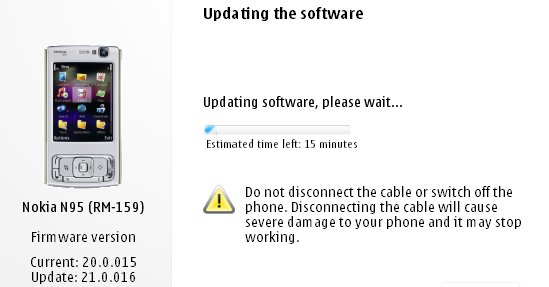
After much waiting it seems Nokia has at last given the Nokia N95 its Flash Lite 3/Web runtime firmware update. Ofcourse we alrady got the utility wares for seeing youtube videos through alternate updates, atleast it's Betterlate than never. It's nowhere near as huge an update as the v20 which introduced demand paging and transformed the performance of the device turning the lowly N95 into as powerfull a machine as the N95 8GB especially with the 16 GB microSD that has since been released. The v21.0.016 is still a major firmware and well worth installing, but i wouldn't recommend it if you are fed up of the Backup&Restore formality.

What's new for v21.0.016 (over and above v20 firmware):

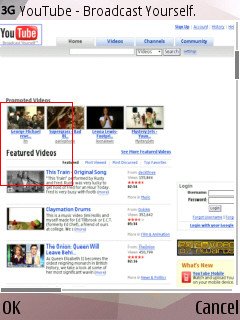
  • Flash Lite 3 is included, so Flash video sites will work, including YouTube (just as on the N95 8GB v15 firmware from a couple of months ago)
  • The Web runtime is included, meaning that standalone widgets are now possible
  • Greater Bluetooth headset compatibility
  • Better handling of entering lots of text into web page dialogs
  • Speedier Gallery in every way
  • Faster Java runtime, so Java apps start faster
  • plus the usual miscellaneous bug fixes and tweaks, no doubt!

Ofcourse they still haven't included the full app of the NGage service, so I guess we ain't going to see it in the near future(even though release had been slated for X'mas '07).

More details and screens at
AllAboutSymbian.

Tuesday, March 11, 2008

N78 User Manual


It seems that the User Manual for the N78 has already arrived ahead of the phone's release. Incase any of you would be N78ers wanna check out the manual and get a sneak peek of the experience that the N78 packs download the manual now - it's in English!

Saturday, February 23, 2008

Internet Radio v1.2


Listen to the world through internet radio. Explore the universe of mobile Internet radio. Browse hundreds of stations and find your favorite show. Listen to music and news from all over the world. Choose from a large variety of stations and shows, including news, sporting events and music. Browse for your favorite radio programs by genre, language, or country, or search by station name. Explore the most popular stations and stay in touch with the mobile Internet radio community. Nokia Internet Radio service is supported by both packet data and WLAN connections. Enhance your mobile device and your life with Nokia Internet Radio (Beta). Download and use the Nokia Internet Radio Player (Beta) application for free* and get started with music and news broadcasts. The following tips may be useful as you start using the Nokia Internet Radio Player (Beta). To best enjoy high-quality content, we recommend using the Nokia Internet Radio Player (Beta) with a WLAN access point. If you already know the name of a specific station, you can easily find that name using the "Search" option. Use "Station Directory" to discover new Internet radio stations, by choosing your favorite genre, country or language. Use the "Top stations" menu to find the most popular choices of other Nokia Internet Radio (Beta) users (Station Directory > Top stations). Use the "Settings" menu to configure the default Internet access point and the audio quality available for different data bearers (Options > Settings). Use "Help" to get extra instructions from the application main page (Options > Help). Setup of WLAN is not managed through the Nokia Internet Radio Player. Refer to your Nseries device user guide for instructions to set up WLAN access points. Supported devices: Nokia 6110 Navigator, N73, N75, N76, N77, N82, N91, N91 8GB, N93i, N95 and N95 8GB.

Monday, February 18, 2008

Why Nokia? Why do you do this??

The N95 is indeed a great camera-phone. It has loads of great
features, 5MP sensor, 30fps video recording, auto-focus camera,
Carl-Zeiss lens, great color recreation, and a whole load of
customization features.

What it lacks is a Video Editor.

I know, I know, it does have one. But have you ever been able to use
it for editing one of those 5MP videos of yours? If yes you'll have
ended up face to face with the now famous slogan of the N95 -[b]
Memory full! Close some programs and try again.
And it flashes up even if you do close all programs, with the video
editor being the only open app. Neat little joke by Nokia huh? But i
think it sucks!
Why did they put in the video editor anyway?? I never understood why they did that..

Ah..and I think Nokia heard my complaints and responded to it
too..albeit in a sad kinda way.


It happened when they brought tout the N95 8GB. A phone that boasts of
128MB RAM, something that we'd begun to see only in computers from
2001. With that kind of RAM I would have been happy editing videos to
glory on my phone. But of course Nokia, by some strike of genius
didn't even include the feature in the handset. Now don't ask me why!
Why they did it, I believe, is, and will remain, a mystery for ages to come.


Update!


Now they plan to bring out the Nokia N96!

Even though Nseries stands for NextGen handsets the only nextGen the N96 packs is a different look - the features are more less the same as in the N95. You only get an extra 16GB of onboard memory and a dual LED flash, which isn'nt that bad., but it ain't worth the money no matter what anyone says!

Monday, January 7, 2008

N95 8 GB onto firmware V15.0.015

A lot of new changes have been announced with the arrival of the New firmware for the N95 8 GB he v15. A list of the slew of features that have been spotted on the new firmware as well as the bugs that have been "Quashed under the hood!" as Steve and Rafe from AAS say, well it's all here. Just move onto their page and checkt things out!
CLiCk HeRe!

Saturday, December 29, 2007

ARGH n95 Screen Flip?

I saw this post at the Nokia Forums the other day. It seems someone's N95 has decided to incorporate Samir's rotateMe app all by itself - ending up rather Topsy-Turvy..
This is the post:


nicbh
New User
Posts: 1


Message 1 of 1

Viewed 11 times


Okay my n95 has started flipping the screen upside down (neither of the two regular ways it would go) randomly. Especially if I turn it off and on again. Any suggestions?
29-Dec-2007 02:58 PM


If any of you can help him out, please do so - this is the link.

Mail for Exchange


If you're using Exchange for the corporate email, you should install the Mail for Exchange application. Mail For Exchange program will provide you with access to your Exchange mailbox.which also features push email. This way you won't have to check for emails each time, the email are pushed to your phone the second they arrive at your mailbox so that you get them instantly.It's Very handy, andyou can even set it up so that it doesn't push any emails in the weekends! :) Tip: The application doesn't work with the normal "TDC WAP 3G+GPRS" setting, since it uses a proxy. You have go use a non proxy setting. You can get the TDC non proxy setting by going here and choosing the "internet" setting.

Nokia Beta Lab's Conversation


Overview

Conversation is a messaging application that allows you to follow your conversations, organized by individual contact. In addition, the application provides an easy way to reply to messages, and continue the conversations.

After installation, the application will appear in your device as an application shortcut, and as a new tab in your Contacts application.

Installation instructions
Your have to install two separate files in the order specified below. Also, we recommend that you use the latest software available for your device.


  1. Install Nokia Internet Services Support Package to the device memory (not to the memory card). Note! If you have Gizmo or Windows Live already installed, you don't need to install this support package.Download (SIS, 730 KB)
  2. Install the compatible version of Conversation application HeRe.
Have a great time with your conversations! ;)


Friday, December 28, 2007

Why NokMote is bigger than we think!

A few days ago I'd posted here about Samir's latest 3D Accelerator based app, the NokMote. But unlike previously shown where it was basically touted to be just a menu controller, Waynder from Symbian-Freak has shown that it does a much better job in turning the phone into a game controler - similar to the Nintedo Wii.

The moment the NGage app gets released, the Mobile Gaming World is going to undergo a reveloution, with possible side-shocks hitting the likes of the Sony PSP,Nintendo GBA, and maybe even the PS3&XBoX! After all using the N95 all Ngage games are playable on TV . We are on the verge of a new era in Gaming, that's for sure!

Wednesday, December 26, 2007

And we bring to you..

Hey guys and gals! Guess what, Nokia's very own WOM-World is going to send me a N800 next week so that I can spend some time reviewing it. And since I won't be needing my N95 then, I'm going to send it off on a vacation - to the Nokia Care Center - for some rejuvination therapy ;) It seems to be a little out of shape lately, with creaking slides, light leaking sides, and a multimedia button that makes a ticking sound..not to mention the system crashes! They seem to have increased after I updated to v20!! It's been long since I've played with a touch screen..my last touch was a 7710. Anyways, the N800 posts will start rolling in a week, so if anyone has anything that you want me to try out on it, just ask. Ciao!

Coming soon..

Given over here are the most awaited phones among smartphone freaks as of now, and they include the sleek N81-like N96, the elegant E61, and Nokia’s WiMAX phone. The specs put up here may not be what actually does come out, but it will give you an idea of what to hope for. Assuming that they do come out.

1) Nokia N96

Nokia N96 is simply out of our imagination. This phone is specially designed with two keyboards.
The main features of the phone are
• It weighs only 115 grams
• It has 10 GB internal memory
• Has digital speakers
• Has 4 speakers
• 6 mega pixel camera with optic zoom
• Has 3.2 inch screen with 16 million colors
• Bluetooth, Wifi , infrared and USB 2.0
• FM Radio
• Phone is available in two colors
• GPS
• Touch screen
• MP3 and MP4

2) The second upcoming mobile is E61

This phone is a great gadget for communicating through email. The features of Nokia E61 are as follows
• better Email with one touch
• You can view and edit email with quick office and acrobat reader
• Its connectivity speed is very high( 3G)
• You can take the advantage of voice features as VoIP calling and conference calling
• It has 2 mega pixel camera

Nokia’s WiMAX phone in 2008

Nokia had revealed that it will launch WiMAX in 2008. Till now only North America and Europe had wireless Technologies on 3G and 3.5G. In supporting Intel wireless standard Nokia will Motorola and Samsung. Nokia did not mention any details about this product. But this cell phone is going to be very stunning. The only information about this product is that it comes in two styles i.e. mobile and fixed locations. This cell phone is going to be eye catching and outstanding.


Courtesy http://mobilemanic.co.uk

Tuesday, December 25, 2007

NokMote in action!

Our beloved Samir, the creator of RotateMe is going to bring out yet another great app, and this one too is based on the newly found 3d accelerometer of the N95 and other similar smart phones running the S60 V3 platform. This app allows you to control your phone completely using shakes and turns. Really nice way to get things done when your alone, but in public, people may laugh at you.. ;)

It's called the NokMote..(rolling drums)...


http://www.bysamir.fr
http://www.forummobiles.com

Monday, December 24, 2007

N95 Accelerometer & FlashLite

Watch this video. FlashLite can also do this with the help of N95 Accelerometer APIs. It's been created and edited by Abhijit and Ganesh and Debashish Paul and has been hosted at http://designtraffic.blogspot.com


The Pundit Report

Search Me