Showing posts with label nokia n95. Show all posts

Thursday, December 24, 2009

Nokia N95-1: Change Log for v35 firmware


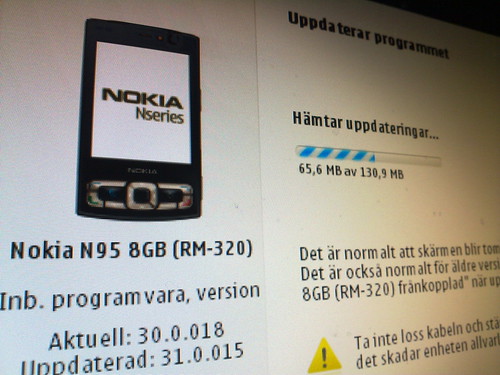
Nokia's flagship for the year 2007, the Nokia N95-1, had just got a surprise firmware update from v30.0.018 to v35.0.015 a couple of days ago. Some changes that I've noticed:

  • Camera start up time is a lot faster now. It just took 1 sec for the app to start up and a quarter of a second for the sensor to stabilize.
  • Pictures in dim light have definitely improved a lot. Couldn't be sure of those in normal conditions though I suspect there is some improvement.
  • Photo processing time is also a lot quicker.
  • There's now 92MB of free memory after the re-flashing. The firmware size has definitely increased.
  • The music player loads up a split second quicker than with the v30.
  • Not sure if hacks for this version has been released yet.
  • NGage is still present even with the planned removal of the service.

Sunday, December 21, 2008

Symbian s60 v3 Themes !

Get your free Nokia themes below!

If you are having problems with themes please read the following posts before asking questions: "certificate error" and "expired certificate"


WMP SKiN
Guess what guys!! A kool guy has designed a skin for Windows Media Player based on our beloved NokiaN95,chek it out..it really is cool and the perfekt addition for the Windows Media Player driver that the
computer comes bundled with. Really nice I must say - kinda like a virtual n95.

=>N95 SKiN<=


N95 theme
This here is a theme put forward by Zach of Symbian In Motion- a blog about our beloved Symbian OS. It's a real cool theme and i absolutely love it, pretty stunning too.Chek it out..
=>DOWNLOAD<=

i95 Theme ;)

This theme caters to those of you who do not plan to go for a iphone but yet like it's feel. Get urself ur very own iphone theme, just make sure you don't let anyone drool right over your phone ;)
To download it from your PC, click here

CLick on the title to download the theme..
Purple bouque
Very rich colouring!

Mac Apple

The cool elegance of a mac,,

Black&Orange

It's a wow theme!
Smiley
Ain't they cute? :)

Cool Reaper

This guy is definitely cool!
Another Green theme
I seem to have a hidden penchant for green..

No Fear

Have no fear, it works..
Macintosh

Cool as usual..
Cool Reaper with a difference
This reaper is froma different era!
Windows XP emulator theme

Wind (default icons) by ICEman
(also available with customized icons)

Nseries 4 by ICEman
Nokia Abstract Style by ICEman
Abstract5 (default icons) By PTWS
(also available with customized icons)
Abstract7 (default icon) By PTWS
(also available with customized icons)
Extra themes: --> CLick here !
Hope you all enjoyed these themes,, there'll be more to come and I'll be glad if you can donate some of them yourself! :)

Most of these themes are compatible for the
N95, N78, N96, N76, N82, n81, E50 , E51 , E60 , E61E61i , E62 , e65 , E70 , E90.

Saturday, November 1, 2008

Efficasoft GPS Utilities for Symbian v1.3.0


Features

Designed GPS information overview.
Free image map real-time navigation. (Advanced caching technology supports fast map operation & ULTRA LARGE map image)
“Go To” function - define your destinations and be guided all the way with distance, TTA, direction guider, proximity alert…
World map view navigation with free-scale zooming.
Digital speedometer & customizable speed alarms.
Two-mode digital compass with dest. information display.
New! Google KML, GPX, CSV format track logger & trip statistics.
Waypoint & POI Manager + 30+ pre-defined POI icons.
Night view mode, fast 0~7 view switch.
Advanced smooth animation effects.
Advanced “5 Sec. Average” and “Kalman Filter” processors for high precision navigation.
Supports built-in & Bluetooth NMEA0183 GPS receivers. Auto detects Bluetooth GPS receiver.

Compatible Phones
All Symbian S60v3 phones with Built-in GPS Receiver e.g. Nokia 6110, 6210, E90, N82, N95, N96 etc.

Download :

Tuesday, April 22, 2008

The TIPings and the TRICKings..


These are some information that will help you find some cool information on your Nokia Nseries & Eseries phone..

Use these codes from the main screen:

If you want your factory settings restored press: *#7780#
Want to get rid of that very annoying operator logo try: *#67705646#
To track down the address of your Bluetooth device press: *#2820#
See what the SIM clock status is: *#746085685#


Locate your phone’s unique International Mobile Equipment Identity: *#06#
Information you get from the IMEI:
XXXXXX XX XXXXXX X
TAC FAC SNR SP


TAC = Type approval code
FAC = Final assembly code
SNR = Serial number
SP = Spare


Double check the call waiting status of your phone: *#43#
Try to reset phone timers and game scores: *#73#
View private number (little suspicious of this): *#30#


To show software version: *#0000#
Information you get from the Software revision-
V 20.00.31
18-02-08
NSE-3

1ST Line = Software revision
2ND Line = The date of the software release
3RD Line = Phone type


To activate the Half Rate Codex and double capacity for voice traffic: *#4720#
In order to deactivate it: *#4720*
Activate Enhanced Full Rate Codec for maximized sound quality: *3370#
Deactivate and add approximately 5% more talk time: #3370#
Check number where “On No Reply” calls are diverting: *#61#
See manufactures code: *#7760#
Check out the Provider Lock Status: #pw+1234567890+1#
The Network Lock Status: #pw+1234567890+2#
Country Lock Status: #pw+1234567890+3#
And SIM Card Lock Status: #pw+1234567890+4#

Additionally, entering “*#92702689#” brings up a subdirectory that displays the serial number, date made, purchase date, date of last repair (if applicable), and transfer user data.


Clock Stopping:
To check weather your SIM Card supports clock stopping type-
*#746025625# (*#SIM0CLOCK#)
Revealing the Headphone and Car-Kit menus:
Please note that if you do these next tricks, the new menus can't be erased without retoring the factory default settings. To do these tricks you need to short-circuit the pins on the bottom of the phone next to where you plug in you charger.

1. To activate the "Headset" menu, you need to short-circuit pins "3" and "4". After a short time the word "Headset" will be shown in the display. Menu 3-6 is now enabled.
2. To activate the "Car" menu, you need to short-circuit pins "4" and "5". After a short time the word "Car" will be shown in the display. Menu 3-7 is now enabled.

THE REBOOT TRICK
This should work on all software versions of the 6110.
1. Go to the Calendar (Menu-8)
2. Make a note or reminder.
3. Enter some text into the edit box.
4. Hold "Clear" until the whole text is cleared, then press "Back".
5. Press "0". The main screen will now be showing but a space appears on the screen. (you can't see it)
6. Enter 4 digits (e.g. 1234).
7. Use the down arrow to move the cursor to the left side of the numbers and the space (Down arrow twice).
8. Now enter 6 digits and press the call button.

Wait for a few seconds, the screen should start to flash and reboots. It should alsowork on other menus like the "Profiles" menu.

EFR CALL QUALITY
To activate EFR (Enhanced Full Rate) Enter the code-
*3370#
This improves call quality but decreases batterylife by about 5%
To deactivate it, Enter the code-
#3370#

THE JAMES BOND TRICK
If you short-circuit theleft middle and right pins on the bottom of the phone with all connections touching each other, the Nokia software hangs! The profile "Headset" will be activated. Before you do this just activate the "Automatic Answer" in the headset profile and set the ringing volume to "Mute". Now you can use your phone for checking out what people are talking about in a room. Just place it under a table in a room and call it. The phone receives the call without ringing and you can listen to what people are saying.

NETWORK MONITOR
There is a hidden menu inside your Nokia phone. If you want to activate it, you'll have to re-program some chips inside of your phone.
Check your software version. You can only continue if you have v4.33, v4.73 or v5.24.
Take apart the phone.
De-solder the EEPROM (ATMEL AT 24C64).
Read out the data with an EEPROM programmer and save it to a file (Backup).
If you have v.33 or v4.73, change the address "03B8" from "00" to "FF".
If you have v5.24 then change the address "0378" from "00" to "FF".
Write the new data to the EEPROM and solder it back to the phone,
Power on your phone and you should have "Netmonitor" enabled.
The Network Monitor gives you the following information.

Carrier number
MS RX Level in DBM
Received signal quality
MS TX power level
C1 (Path loss criterion, used for cell selection and reselection). The range is -99 to 99.
RTL (Radio link timeout).
Timeslot
Indication of the transmitter status
Information on the Network parameters.
TMSI (Temporary Mobile Subscriber Identity).
Cell identification (Cell ID, Number of cells being used).
MCC (Mobile country code)
MCN (Mobile network code)
LAC (Location area code)
Ciphering (On/Off)
Hopping (On/Off)
DTX (On/Off)
Discard cell barred information

CHECK SIM-LOCK
If you bought your Nokia on UK Vodafone or UK Cellnet you do not need to check this because they both transmit on GSM900, and they don't usually lock the phones. However if you bought your phone on UK Orange or UK One2one your phone may be blocked. The reason is that they both transmitt on GSM1800. To make a call on GSM1800 you need what is known as a "Dual band" phone. A dual band phone is able to transmit on both GSM900 and GSM1800, so they lock the phones so you can't use it with any other network simcard. If you find that your phone is locked you can try different software to unlock it. (we havn't found one that works yet), or you can ask your service provider who will gladly exchange the 10 digit code for about £35.
This is how to check the status of the 4 different locks. Aslo don't try entering the wrong number, because after 3 times it will block the phone for good.

There are 4 different locks on your Nokia phone.
COUNTRY-LOCK
NETWORK-LOCK
PROVIDER-LOCK
SIMCARD-LOCK
The code to read out the sim-lock status of your phone is

#PW+(MASTERCODE)+(Y)#
# = DOUBLE-CROSS
W = PRESS "*" THREE TIMES
P = PRESS "*" FOUR TIMES
+ = PRESS "*" TWO TIMES
MASTERCODE = 1234567890
Y = NUMBER 1 TO 4
The master code is a secret code. The code has 10 digits, To read out the sim-lock status you can enter every combination you want!
"Y" Shows the status of the network-lock. Here you can enter a number from "1" to "4". The "4" is for the sim-card lock.
SIM-LOCK CHECKS
#PW+1234567890+1# = GIVES PROVIDER-LOCK STATUS
#PW+1234567890+2# = GIVES NETWORK-LOCK STATUS
#PW+1234567890+3# = GIVES COUNTRY-LOCK STATUS
#PW+1234567890+4# = GIVES SIM-CARD-LOCK STATUS


Courtesy http://nokiatone.ifrance.com/nokiatone/secrets.htm

Tuesday, April 15, 2008

Sony K850i vs Nokia N95-1

Images of the K850i vs the N95..Pitch black image capture: The K850i9(2nd) with Xenon Flash vs the Humble LED of the N95(first). Image lighting is fully based on the flash here.
Medium Darkness: Phone has to focus the glass in dark conditions.. since the glass is the object it'll be more difficult. N95 is first with K850i second.Normal photography: The n95 image had too much of blue in it.
Close-up with Flash: I love both of them - they seem to have their pwn personal effect on the image.


Result: Image capture using the K850i is excellent in perfect conditions with good lighting, but when the light gets dim the photos suffer a lot. The n95 has excellent photography software but the flash ain't good enough.

The title picture was taken using a N73ME - i should say that when i took an image in the 3MegaPixel setting the N73 turned out to be the best!

Monday, April 7, 2008

MWN - The Sony Ericsson vs The Nokia


Nokia and Sony Ericsson have been at war for long. The last Flagship Nokia the N95 series which includes The N95 Classic, the N95 8GB and the American edition have all packed quite a punch. Their features are still cutting edge - so much that even the upcoming N96 doesn't offer anything groundbreaking compared to them.

But is it that bad? The lst battle between them was on the 3MP ground (n73 vs k790i..remember?). And now we have the 5 megapixel autofocus battle of late 2008 - the N95 vs. the just-released K850i. We think the 6 month later intro isn't such a bad thing for a variety of reasons, including
  • Two phones target different users: smartphone to the max vs. elegant feature phone with stunning looks.
  • Nokia always needs a few months and firmware updates to iron out the imaging gremlins.
  • Once import prices settle, the K850i will be a significantly lower priced device than the feature-laden N95 models.
This is a "K Series" Cybershot phone, and that puts the camera on center stage as fa as SE is concerned. The 5 megapixel camera has an autofocus lens, automatic lens cover and a Xenon flash. There's 16x digital zoom, Sony Ericsson's BestPic feature, image and video stabilization and red eye reduction. Fancy stuff for a camera phone, and in fact, the K850i, a bit more than the beloved Nokia N95, makes us want to leave our dedicated point-and-shoot camera at home. Nokia fans defends the LED flash of the N95 by saying that xenon is not suitable for video capture. But inorder to use the LED during video capture you have to do a little hackng yourself, which could void the gaurantee.

The Nokia N95 and the Sony Ericsson K850i are both GSM phones with 3G, a music player and a 5 megapixel camera with autofocus lens. The close similarities end there. The question is Do you want a smartphone with WiFi or a GPS while staying with looks that are minimal?? If the answer is yes, the N95 is your hone. If these aren't important to you, then the K850i is in the running. K850i is arguably more attractive and is bit smaller, has better voice quality and a much better music player. The N95 is stronger on the video playback and video recording (VGA on the N95 vs. QVGA on the K850i). Both do equally well on reception and both have good build quality (those obsessed with wobbly sliders will probably feel better about the SE's solid candy bar design).

Conclusion

The K850i improves significantly on the Cybershot K790i that it expects to replace. Though on the surface it looks like a face-lifted version of the K790i and K800i, inside there's a lot of good new stuff going on: the 5MP camera with improved still images and much improved video, quad band phone rather than triband, worldwide 3G with HSDPA, the new media player (we love the interface), improved music player, Bluetooth A2DP and a much brighter and a bit bigger display. This is a phone that's hard to not like.

Pros:Beautifull camera with faster imaging performance than the N95, fantastic display, excellent Bluetooth with a large selection of profiles and good range, has both M2 and microSD card slots. Good battery life for a 3G phone with a Xenon flash. Finally, standard call send and end buttons on a Sony Ericsson phone!! Phone is responsive and stable, good HTML browser by feature phone standards with support for MS Exchange and push email.

Cons: Keypad isn't good for heavy texters. Great touch controls, but funky d-pad. Night time and dim scene imaging on automatic setting is bad. Fast port connector instead of 2.5 or 3.5mm stereo jack (you'll have to get yourself another headphone!). HSDPA speeds could be better.

Courtesy MobileTechReview.

Other MWN episodes:

N95 vs iPhone
N95 vsiPhone Imaging
3G Wars

Monday, March 31, 2008

N95 Kaliedoscope


Nokia N95 is now available in 3 new colors, White, red and blue. But it seems that the new colors is only available in Japan by the provider “SoftBank” :( Lets hope that it doesn’t take to long before the new colors is available world wide :). Check out the covers over here too at another post from dailymobile.

More pictures available at DailyMobile.

Friday, March 28, 2008

Currencies – mobile currency converter with real time exchange rates

Symbian Guru released the new software Currencies – mobile currencies converter with real time exchange rates from the Central Bank and your own currencies rates set manually.

Currencies gets real time exchange rates from European Central Bank directly to your mobile. You only have to activate the GPRS connection.There are two types of currencies: the predefined list of most used world currencies and list of your own currencies, which rates you can set manually. You can set the exchange rates of your currency to one of the main currencies and to save it.

There is an auto refresh option available: you can update all the rates instantly by pressing the menu Option – Update rates.

Currency conversion is made easily: you just set the initial and final currency as well as amount. There is unlimited amount of currencies that you may convert with Currencies application. The result you will receive immediately after entering the initial data.

Key Features:

• Real time exchange rates data

All data overview with one click on your mobile

• Ability to add your own currencies as well as their rates

• Ability to convert unlimited amount of currenciesMore info as well as pdf user manual for

Currencies can be found on http://www.symbianguru.com.

Thursday, March 27, 2008

16gb microSD - now that's mass storage!

John has hooked us up with live photos showing the N95, E51, Sony Ericcson, and E90, all rocking the upcoming 16GB microSDHC card from Sandisk. The card was announced earlier this year with much hype. The card should also work in the upcoming handsets as well as in our N95s and N82s - support could hopefully along with the next majr FW update.

Sadly the 16GB MicroSDHC card from Sandisk is not expected to be commercially available until later this year, though you can already pick up an 8GB for under $80. Sadly for the N95 8GB user they won't be able to make use of any improements in the microSD technology since they don't have support for it, but Nokia has given the Nokia N96 best of both worlds - 16Gb onboard memory as well as an expandable microSD slot. WHat more could you ask for?1!

Saturday, March 15, 2008

Paid Upgrade to S60 v3 fp 2 ?

Do you think they should have a paid Upgrade to S60 v3 fp 2 ? The Nokia N95 Blog investigates balancing the need for Nokia to turn up huge profits on one hand and giving better customer satisfaction. Personally I think they need to take care of customer satisfaction a bit more than their current ways. But of course I've heard that most of their huge profits are re-invested back into the fight to get out the best handset yet, and with recent times the fight has grown, with the new slew of phones from SonyEricson and Motorola.
Read the whole article here at
TheN95Blog.

Tuesday, March 11, 2008

N95 gets a better slider upgrade

As I've posted over here before, I have been a victim of the dumb N95 slider from the time I'd bought it, and even though I'd sent it in to Nokia numerous times, they still couldn't find a cure for it. But last week after I'd sent it in, they were finally able to set it right and now i have an almost perfect rock-solid slider. And as shown above the slider mechanism sure is new! If they'd done this earlier there would lots more happy N95ers out here..
Photo from SymbianWorld.

Friday, February 29, 2008

iGo Everywhere - Power and charge!

They sent one of these to me...and I'm absolutely Loving iT!!
There are some really annoying things about traveling around with a load of the latest gadgets with you, but the worst thing is when one of your gadgets battery runs out or is so low that you have to switch it if just to save the battery in case you will need it in an emergency. ANd the worst part is that companies like Nokia take it that they have to manufacture almost everything related with mobiles - even Mobile computing,GPS,hi-res cams,etcetera but they don't have the time to design a decent battery!

Well iGo must have been listening to the all those tech-savvy die hard travelers for they have come up with the ultimate universal wall and auto adapter, this is every adapter that anyone will ever need whether you are in the car or in a hotel room, the only thing that you should need to do is change the end of the adapter(the power tip) suitable for the device that needs power, and that's it, simple but effective for mobile phones, blue tooth headsets, PDA’s, portable music players, portable games consoles and digital cameras, plus there may be a few more that may need some charging up.

Basically it is a single power cable that fits both the mains plug and the in-car cigarette lighter. You then buy the appropriate tips to match your gadget – be it a mobile, handheld games console, MP3 player, Bluetooth headset, or basically anything, with only a few exceptions. There’s even a Power Splitter available which let’s you charge two devices at the same time. Neat,eH?

igoThis product is so versatile that it's quite possible that all other chargers would become obsolete, as it's much easier to carry around one charger than a whole bag of different chargers and adapters for each device that you own.

This is an essential piece of travel kit, which can get the traveler out of a bit of bother if one of those essential gadgets runs low on power, the price for the set is only around £20 or $40 US. The whole lot of iGo Everywhere tools can be seen here.
Saturday, February 23, 2008

Internet Radio v1.2


Listen to the world through internet radio. Explore the universe of mobile Internet radio. Browse hundreds of stations and find your favorite show. Listen to music and news from all over the world. Choose from a large variety of stations and shows, including news, sporting events and music. Browse for your favorite radio programs by genre, language, or country, or search by station name. Explore the most popular stations and stay in touch with the mobile Internet radio community. Nokia Internet Radio service is supported by both packet data and WLAN connections. Enhance your mobile device and your life with Nokia Internet Radio (Beta). Download and use the Nokia Internet Radio Player (Beta) application for free* and get started with music and news broadcasts. The following tips may be useful as you start using the Nokia Internet Radio Player (Beta). To best enjoy high-quality content, we recommend using the Nokia Internet Radio Player (Beta) with a WLAN access point. If you already know the name of a specific station, you can easily find that name using the "Search" option. Use "Station Directory" to discover new Internet radio stations, by choosing your favorite genre, country or language. Use the "Top stations" menu to find the most popular choices of other Nokia Internet Radio (Beta) users (Station Directory > Top stations). Use the "Settings" menu to configure the default Internet access point and the audio quality available for different data bearers (Options > Settings). Use "Help" to get extra instructions from the application main page (Options > Help). Setup of WLAN is not managed through the Nokia Internet Radio Player. Refer to your Nseries device user guide for instructions to set up WLAN access points. Supported devices: Nokia 6110 Navigator, N73, N75, N76, N77, N82, N91, N91 8GB, N93i, N95 and N95 8GB.

Friday, February 22, 2008

Expenses 2.0


SymbianGuru has updated its expense tracking software and released Expenses 2.0. The update has following new features implemented:-
Now application is password protected, and secures your expenses from unauthorised access

- The font and colour of the on screen reports became customizable
- User now can create own expenses categories, for sorting the expenses according to the needs
- Bug with big numbers import was fixed

Expenses for Series 60.3 organizes private and business expenses in quick and easy way. Comprehensible interface, quick but password protected access to
all expenses make Expenses to beloved tool for budget optimization.

Expenses 2.0 for Series 60 3rd edition track all kinds of expenses, create customized on-screen reports and export expenses records into CSV format for
MS Excel.

Expenses for Series 60.3 save your time and save your money, optimizing your budget. It is unbearable tool for home and business finance.

Key Features of Expenses 2.0 include:

1. Customizable list view of all your expenses, also with the personal notes
2. Secure password protection
3. Application options lets user personalize the main page view, report view, all used expenses types, currencies and payment methods
4. When recording a new expense, the most used expenses types will come first in the list to avoid much scrolling
5. Unlimited number of expenses categories can be created for keeping separately different expenses types
6. User can make a personal note to every expense
7. User can get the total of all expenses just with one click
8. Report on screen can be made, with custom data chosen for the certain period and fully customizable report view
9. Easy export MS Excel (universal CSV format)

Wednesday, February 13, 2008

An N95 on Val's Day is a perfect idea

Gifting your girl friend a N95 would be the best gift ever. But whatif you have it with a cute lil' pink housing that comes with a softsmooth finish? Now that would be really something 'cuz she'd know thatyou really put your mind into giving her something nice, rather thanjust spending money on the best in the market. And when her friendssee the pink N95 they're bound to ask about it. nice eh? ;) Did you know that Darla Mack also has a pink one!!

Sunday, February 3, 2008

How to Make Your Cell Phone Battery Last Longer


While many of us now use cell phones everywhere, the primary benefit of cell phones remains their portability - however, so as to get the most out of your phone you need to get the most out of your battery.

Increase Time between Charges
1. Turn the phone off. This is probably the most effective and simplest way of conserving your battery’s power. If you don't plan on answering the phone while you're sleeping or after business hours, just turn it off. Do the same if you are in an area with no reception (such as a subway or remote area) or in a roaming area, since constantly searching for service depletes the battery fairly quickly. Some phones have an automatic power save feature, but it takes about 30 minutes with no service to kick in. By then, much battery power has been used.

2. Stop searching for a signal. When you are in an area with poor or no signal, your phone will constantly look for a better connection, and will use up all your power doing so. This is easily understood if you have ever forgotten to turn off your phone on a flight. The best way to ensure longer battery life is to make sure you have a great signal where you use your phone. If you don't have a perfect signal, get a cell phone repeater which will amplify the signal to provide near perfect reception anywhere.

3. Get the most out of your battery. Switch off the vibrate function on your phone, and use just the ring tone instead. The vibrate function uses up a lot of battery power. Keep the ring tone volume as low as possible.

4. Turn off your phone's back light. The back light is what makes the phone easier to read in bright light or outside. However, the light also uses battery power. If you can get by without it, your battery will last longer. If you have to use the back light, many phones will let you set the amount of time to leave the back light on. Shorten that amount of time. Usually, one or two seconds will be sufficient. Some phones have an ambient light sensor, which can turn off the back light in bright conditions and enable it in darker ones.

5. Avoid using unnecessary features. If you know it will be a while before your phone’s next charge, don’t use the camera or connect to the Internet. Flash photography can drain your battery especially quickly. If your phone has bluetooth capability, disable it when not in use.

6. Keep calls short. This is obvious, but how many times have you heard someone on their cell phone say, "I think my battery’s dying," and then continue their conversation for several minutes? Sometimes, the dying battery is just an excuse to get off the phone (and a good one, at that), but if you really need to conserve the battery, limit your talk time.


Prolong the Life of Your Battery

1. Initialize a new battery. New batteries should be fully charged before their first use to obtain maximum capacity. Nickel-based batteries should be charged for 16 hours initially and run through 2-4 full charge/full discharge cycles, while lithium ion batteries should be charged for about 5-6 hours. Ignore the phone telling you that the battery is full--this is normal but is not accurate if the battery is not initialized.

2. Keep the battery cool. Your battery will last longest if used near room temperature, and nothing wears on a battery like extended exposure to high temperatures. While you can’t control the weather, you can avoid leaving your phone in a hot car or in direct sunlight, and you don’t have to carry your phone in your pocket, where your body heat will raise its temperature. In addition, check the battery while it’s charging. If it seems excessively hot, your charger may be malfunctioning.

3. Charge your battery correctly, in accordance with its type. Most newer cell phones have lithium-ion batteries, while older ones generally have nickel-based batteries. Read the label on the back of the battery or in the technical specifications in the manual to determine which yours is.
* Nickel-based batteries (either NiCd or NiMH) suffer from a phenomenon known as the "memory effect." If you charge the battery partially enough times, eventually the battery "forgets" that it can charge fully. A nickel-based battery suffering from memory effect can be reconditioned, which requires the battery to be completely discharged, then completely recharged (sometimes several times). The appropriate length of time between reconditionings varies. A good rule to follow for nickel-battery cell-phones is to discharge them completely once every two to three weeks, and only when you have a charger available. * Lithium ion batteries, on the other hand, do not suffer from the same memory effect. However, many devices that use lithium batteries have a battery meter, showing the user how much charge the battery has left. Starting with a battery's manufacture at the factory, lithium ions oxidize in the battery, shortening its life. After a certain amount of time, the battery exhibits slightly different electronic properties, which the device can only detect when the battery is discharged. This type of problem is known as a "virtual memory effect" and occurs when your battery meter can show a high charge, then suddenly drop to low charge when the battery is almost dead. Every thirty cumulative cycles, you should discharge lithium ion batteries until the phone gives a low battery warning, then recharge it. If you discharge lithium ion batteries to zero voltage, the internal safety circuit may open. In that case, a normal charger will be inadequate. Reconditioning ensures that the battery meter on a lithium ion cellphone is accurate (although it will not affect actual battery capacity). * Regardless of the battery type, use only a charger rated for your battery, and discontinue use of a charger that causes the battery to heat up excessively.

4. Store batteries properly. If your battery will be out of use for a while, disconnect it from the phone and store it in a cool place (the refrigerator is good, but freezing temperatures do not slow oxidation) and away from metal objects. Ensure that the battery is not exposed to moisture; try putting the battery in an airtight container or bag. Lithium ion batteries are not rated to operate at refrigerated temperatures, so let the battery sit outside the refrigerator for at least an hour before using it again. Lithium ion batteries oxidize least when they are stored at 40% charge. Never store a lithium battery at low voltage. Recharge batteries after storage.

5. Clean the battery contacts on the battery and on the phone. Over time, contacts may accumulate dirt. Clean them with a cotton swab and rubbing alcohol to maximize the efficiency of energy transfer. In addition, if the contacts are two different metals, such as gold and tin, accelerated corrosion known as "fretting" occurs. Cutting the corrosion from fretted contacts often requires solvents, such as acetone or nail polish remover. Be careful: these solvent dissolve plastic, so use a Q-Tip to avoid damaging the battery housing or the phone.

Battery Failure Indicators


* The usable time after recharging is shortened.
* The battery becomes unusually warm during a rechargecycle. * The battery becomes unusually warm during phone use. * The battery case often is swollen. This is detectable by feeling and viewing the inside/phone-side of the battery case. Also, when the battery is placed inside/phone-side down on a flat, smooth surface, it will rock and will sustain a spin motion. The case of a healthy battery is flat and will not sustain a spin motion. * The battery develops a hard spot. This is detectable on the inside/phone-side surface of the battery by gently pinching about the surface between one's fingers.

Tips

* Regardless of how well you care for your battery, it will die eventually. When it does, you may be able to have it refurbished by sending it to the manufacturer or bringing it back to the retailer. If it cannot be refurbished, or if you just want to get a new battery, be sure to recycle it, either by returning it to the manufacturer or retailer, or by bringing it to a recycling center. Most major retail electronics stores have drop-off boxes for recycled phones. * You should not have to turn off your phone to charge it. Most battery chargers deliver more than enough current to power your phone and charge it at the same time. Doing so will not lengthen the charge time, and leaving a phone on allows the user to be aware of its fuel gauge, so that you can remove it when the battery is full. * When using a car charger, do not charge the battery when the inside temperature of your car is hot. Wait until the car has cooled before you plug in the phone.

Note:


* Do not store a lithium battery with a very low charge for a long time, the battery monitor will draw a small current, which might cause a 'deep discharge' which may cause damage to the battery. * Avoid cheap, knockoff chargers as they may cause excessive battery heating. * When buying lithium ion batteries, be aware that oxidation begins at the time of manufacture, not the time of first use. As such, older lithium batteries will have reduced capacity (about 20% per year stored at room temperature). If you buy a battery at a clearance sale price, expect that you will get less life out of the cell phone. * Never dispose of old batteries in the trash. Batteries contain toxic metals, and electronic waste from batteries and other electronic components is becoming a major problem. Improper disposal of toxic batteries is illegal in many jurisdictions.

Saturday, February 2, 2008

My Portfolio for s60-3 released: get your Google Finance data to your mobile!


SymbianGuru released the new Freeware business solution My Portfolio for Series 60-3 mobile phones. My Portfolio updates Google Finance courses information directly from your Google Finance account to your mobile. You have only to enter correct login and password for Google Finance and have Google Finance account active.

My Portfolio is a free Series 60 v3 finances application that updates your Google Finance portfolio in the real time on your mobile. You get the most needed information from your own portfolio displayed, such as: company name; symbol, last price and percent change.

All other data about your portfolio units is also available, exactly as you can get it online.

There is an auto refresh option available: My Portfolio will be automatically refreshed with the updated data every set period of time. Please note: the auto refresh function will work only if the My Portfolio application is open.

You can also get the history of every unit in your portfolio, based on time period defined by you.

My Portfolio key features:
- Easy setup and login

- Detail view of all stocks

- Auto-refresh function
- History for a certain stock can be requested

- Help feature implemented
- Totally freeware!


My Portfolio is freeware, users who like it are asked to donate at www.symbianguru.com

Friday, January 25, 2008

N95 in pink!

Some real ccol pics of the N95 in pink clothing, i luv it.. reminds of a post that I'd done some time back..
I've included one pic here, you can see the rest of them at Dailymobile.se.

Sunday, January 13, 2008

Koss P9 - perfect for Mobile users on the move


The Koss P9 In-Ear Headphones with Volume Control features a convenient volume control feature that can be easily adjusted on the fly. Lightweight with a comfortable behind-the-head design, these headphones are made to be worn for long periods of time and are perfect for listeners on the go. Compared with the regular headset available with the N95 the Koss P9 offers almost the same output in terms of sound, but the added bonus is that it has much more stylish looks.

One of the other applications that I found for it's side-firing design is that it's more wearable than usual headsets when your on a motorbike - it's design is kind of aerodynamic that there's less chance of the headset falling off when you're at high speed. Moreover the side-firing technology means you're more likely to hear horns and other external sounds from your surroundings - leading to a safer experience. Obviously no one would use Noise Cancelling Phones when on the road - you won't even hear the Traffic Police man's whistle!!


On the other hand it's sound isn't that much of a reason to go for it. It lacks the bass that Koss advertises so much, and the some frequencies are really bad. Upon comparison with the Standard Nokia headset that comes with the N95 - the Koss P9 is somewhat 80% there.

Straight, dual entry 4 foot cord Plug 3.5mm
Impedance 16 ohms
Weight .7 oz.
Sensitivity 100 dB SPL/1mW
Distortion <1.0%
Cost: 9.99$

Saturday, December 29, 2007

Mail for Exchange


If you're using Exchange for the corporate email, you should install the Mail for Exchange application. Mail For Exchange program will provide you with access to your Exchange mailbox.which also features push email. This way you won't have to check for emails each time, the email are pushed to your phone the second they arrive at your mailbox so that you get them instantly.It's Very handy, andyou can even set it up so that it doesn't push any emails in the weekends! :) Tip: The application doesn't work with the normal "TDC WAP 3G+GPRS" setting, since it uses a proxy. You have go use a non proxy setting. You can get the TDC non proxy setting by going here and choosing the "internet" setting.

The Pundit Report

Search Me