Showing posts with label s60 v3. Show all posts

Friday, April 17, 2009

Joikuspot Light 2.4 now supports Nokia 5800

JoikuSpot is a free mobile software solution that turns a Nokia Smartphone to a WLAN HotSpot. You will carry internet in your pocket. Connect your laptop to web everywhere! Free JoikuSpot Light allows you to freely surf the web. With Premium Edition you can do much more: Premium is optimized for fastest connection speed and maximum connection stability, connects to your corporate intraweb and email securely (Outlook, Gmail, etc.), and supports all additional network protocols such as Skype and MSN. In addition, there is no forced landing page in Premium Edition.


13 languages are supported.

JoikuSpot software is installed directly to the phone. When switched on, laptops and iPods can establish instant, secure and fast WLAN connection via phone’s JoikuSpot HotSpot using phone’s own 3G internet connection.
Multiple devices can connect to JoikuSpot in parallel and seamlessly share the same 3G internet connection. Connection is not limited to laptops, but other WLAN gadgets can connect as well.
This version works with both s60v3 and s60v5 phones


Download

Source: Dailymobile

Thursday, January 22, 2009

We’ve Got 2 Free Licenses For StyleTap for S60

Yeah, that’s right - we told you about the new StyleTap for S60 PalmOS emulator, which was only just released. This application allows you to run nearly any of the 30,000+ PalmOS applications on your S60 phone, including such classics as Epocrates. StyleTap runs on any S60v3 or S60v5 phone currently on the market, from the N95 to the N79 to the 5800 XpressMusic. Full hardware support is there, too, including screen rotation.


You can download the free 14-day trial from StyleTap’s website, and you can purchase the fully licensed copy for $49.95 from their site. However, because we know the economy sucks right now, StyleTap was kind enough to offer 2 free licenses to Symbian-Guru readers!
To enter, all you need to do is
register at the Symbian-Guru Forum (don’t worry, it’s free), and then leave a comment on this post, telling us what device you’ll be using your StyleTap license on. That’s it, super easy! We’ll do the drawing on Wednesday, January 21st.

Sunday, November 16, 2008

Nokia Updates Share Online For S60v3 FP2 Devices


The Nokia Beta Labs has launched an updated Share Online, v4.0 today. Thanks to some technical features, this new version is only compatible with S60v3 FP2 devices, and is even limited to only the N96, 6210 Navigator, 6220 Classic, and 5320 XpressMusic, at least for now. Versions for the N78, N79, and N85 are apparently in the works, but there’s no mention of the 6650 or other S60v3 FP2 devices being supported.
This new version of Share Online brings several new features, including a redesigned Active Standby plugin that allows the user to disable it, if they wish. It will also show the current upload progress on your home screen, which is nice.


Share Online v4.0 also allows you to set it to upload with WiFi only, and the application will queue your uploads until it’s in range of a known hotspot. You can also now have multiple uploads in queue at once, which is a really nice feature, and something I complained about earlier.

If you own the N96, 6210 Navigator, 6220 Classic, or 5320 XpressMusic, you can download the new version here. If you have another S60v3 FP2 phone, you’ll need to wait a bit for the correct version. Installing the wrong version can hose your Gallery application.

Sunday, October 12, 2008

Efficasoft GPS Utilities for Symbian v1.3.0


Mobile GPS solution for your Symbian handset and be ready for travelling, hiking, driving, geocaching and more!

Features
Designed GPS information overview.
Free image map real-time navigation. (Advanced caching technology supports fast map operation & ULTRA LARGE map image)
“Go To” function - define your destinations and be guided all the way with distance, TTA, direction guider, proximity alert…

World map view navigation with free-scale zooming.
Digital speedometer & customizable speed alarms.
Two-mode digital compass with dest. information display.
New! Google KML, GPX, CSV format track logger & trip statistics.
Waypoint & POI Manager + 30+ pre-defined POI icons.
Night view mode, fast 0~7 view switch.
Advanced smooth animation effects.
Advanced “5 Sec. Average” and “Kalman Filter” processors for high precision navigation.
Supports built-in & Bluetooth NMEA0183 GPS receivers. Auto detects Bluetooth GPS receiver.
Compatible PhonesAll Symbian S60v3 phones with Built-in GPS Receiver e.g. Nokia 6110, 6210, E90, N82, N95, N96 etc.

Saturday, May 17, 2008

Symbian Application: Weatherbug Widget For S60v3

WeatherBug announced the WeatherBug S60 widget today for select nokia devices. WeatherBug’s S60 widget will utilize Nokia’s latest Web Runtime Technology (WRT) to bring local weather info to your phone.The WeatherBug S60 widget includes live, local weather information for more than 50,000 locations worldwide and is local language supported for all regions.
Yet another move that’s sure to upset all the N95-3 owners out there, the first official S60 Widget is now available for regular consumption. The WeatherBug widget, announced a few weeks ago (before they had an actual download available, silly meteorologists!) is now available to download, and should be popping up in the S60 Download! app soon, as well.
The widget is only compatible with handsets that have Web RunTime support, which currently includes the N82, N95-1, -2, and -4.

Anyways, the widget allows you to check the weather around the world for free, though it is ad supported, so you’ll see a few logos here and there. WorldMate Live offers more options in a prettier package, and works on more handsets.

Download Weatherbug

Courtesy
http://www.dailymobile.se/

Monday, May 5, 2008

Ultimate Voice Recorder For S60 3rd Edition

This application is designed to satisfy all your recording needs. It will let you record a voice memo or phone call anytime by simply pressing hotkeys of your own choices or by executing pre-planned functions that you can customise. Phone calls can also be recorded automatically based on your choices. You can record very long memo or conversations - even extendable until your memory limits(512kb free). You can also let the application automatically forward recorded clips to your default email or phone number by Email or MMS. The application will automatically stop recording once the storage space is low on your phone and never will fill up your phone! Hotkeys work anytime, always! Free upgrades of future versions are available as well!

The application is a Symbian Signed application backed by the industrial standard Quality Assurance testing procedure.

New In Version 4.01
Please remove the old version from your phone before installing this version.

  • Phone recordings are saved with caller id/phone number.
  • Automatic Email/MMS forwarding of recorded clips.
  • Hide recorded clips from other software on your phones.
  • Search recorded clips by label, phone number
  • Enable/Disable hotkeys.
  • Better password protection.

Monday, April 28, 2008

Symbian Application: Battery Voice English (only for N95, speaks ur battery life)

This is a real neat app that is yet another great use for the Nokia N95 accelerometer. This time around it is used for knowing the battery life of your phone. You just shake your phone and the lady in the phone tells you how much bars of battery you have got left!

The program is under development, but 100% functional, jusr swing your phone!

When i tested it out the application worked very well on my Nokia N95, It is worth installing and testing the program!

Note: Battery Voice is beta software and it uses python as well.

Thanks to Rafael Abrantes(developer) for this app.

Please read the readme.txt inside rar file to correctly install it

Download

Thursday, March 27, 2008

N95 gets yet another FW update!

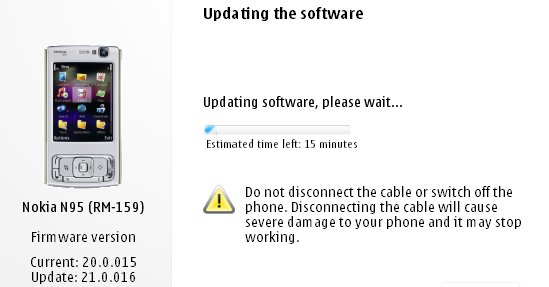
After much waiting it seems Nokia has at last given the Nokia N95 its Flash Lite 3/Web runtime firmware update. Ofcourse we alrady got the utility wares for seeing youtube videos through alternate updates, atleast it's Betterlate than never. It's nowhere near as huge an update as the v20 which introduced demand paging and transformed the performance of the device turning the lowly N95 into as powerfull a machine as the N95 8GB especially with the 16 GB microSD that has since been released. The v21.0.016 is still a major firmware and well worth installing, but i wouldn't recommend it if you are fed up of the Backup&Restore formality.

What's new for v21.0.016 (over and above v20 firmware):

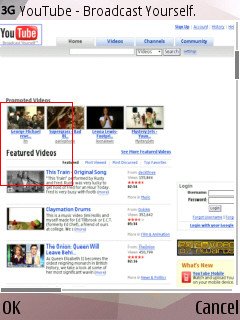
  • Flash Lite 3 is included, so Flash video sites will work, including YouTube (just as on the N95 8GB v15 firmware from a couple of months ago)
  • The Web runtime is included, meaning that standalone widgets are now possible
  • Greater Bluetooth headset compatibility
  • Better handling of entering lots of text into web page dialogs
  • Speedier Gallery in every way
  • Faster Java runtime, so Java apps start faster
  • plus the usual miscellaneous bug fixes and tweaks, no doubt!

Ofcourse they still haven't included the full app of the NGage service, so I guess we ain't going to see it in the near future(even though release had been slated for X'mas '07).

More details and screens at
AllAboutSymbian.

Tuesday, March 11, 2008

N95 gets a better slider upgrade

As I've posted over here before, I have been a victim of the dumb N95 slider from the time I'd bought it, and even though I'd sent it in to Nokia numerous times, they still couldn't find a cure for it. But last week after I'd sent it in, they were finally able to set it right and now i have an almost perfect rock-solid slider. And as shown above the slider mechanism sure is new! If they'd done this earlier there would lots more happy N95ers out here..
Photo from SymbianWorld.

Friday, March 7, 2008

Mining for lost SMS messages?

If you by chance happened to delete your messages, and feel like reading them again, then here's what Kishore from mynokiamobile.blogspot.com says you gotta do:

To do this you need to have FExplorer on your Nokia Phone. (or click on the link)

  1. Open FExplorer.
  2. Select drive C: or D: depending on the memory in which the SMS messages have been saved.
  3. In my case I selected C: , Then open "system" folder. Then in the "system" folder open "mail" folder. Then in this folder u will see different folders (eg 0010001_s) and certain files (eg 00100000). These files are the actually messages.
  4. Browse through each folder and chack for the file till u get the one that you are looking for.( a very tiring process..Zzzzzzzzzz)
  5. For opening the files don't choose options>file>open as it will show format not supported rather choose options>file>hex/text viewer. By selecting the "Hex/ text viewer" you ll be able to open and read the deleted SMS message.
Have a great time mining though your collections! ;)

Saturday, February 23, 2008

Internet Radio v1.2


Listen to the world through internet radio. Explore the universe of mobile Internet radio. Browse hundreds of stations and find your favorite show. Listen to music and news from all over the world. Choose from a large variety of stations and shows, including news, sporting events and music. Browse for your favorite radio programs by genre, language, or country, or search by station name. Explore the most popular stations and stay in touch with the mobile Internet radio community. Nokia Internet Radio service is supported by both packet data and WLAN connections. Enhance your mobile device and your life with Nokia Internet Radio (Beta). Download and use the Nokia Internet Radio Player (Beta) application for free* and get started with music and news broadcasts. The following tips may be useful as you start using the Nokia Internet Radio Player (Beta). To best enjoy high-quality content, we recommend using the Nokia Internet Radio Player (Beta) with a WLAN access point. If you already know the name of a specific station, you can easily find that name using the "Search" option. Use "Station Directory" to discover new Internet radio stations, by choosing your favorite genre, country or language. Use the "Top stations" menu to find the most popular choices of other Nokia Internet Radio (Beta) users (Station Directory > Top stations). Use the "Settings" menu to configure the default Internet access point and the audio quality available for different data bearers (Options > Settings). Use "Help" to get extra instructions from the application main page (Options > Help). Setup of WLAN is not managed through the Nokia Internet Radio Player. Refer to your Nseries device user guide for instructions to set up WLAN access points. Supported devices: Nokia 6110 Navigator, N73, N75, N76, N77, N82, N91, N91 8GB, N93i, N95 and N95 8GB.

Thursday, February 14, 2008

N96 - is it worth it?


From what I've heard the N96 doesn't have anything new to go with it except the looks... This smartphone is based on the Symbian S60 3rd Edition operation system, with Feature Pack 2, and sports a DVB-H digital TV receiver and innovative kickstand for watching video on the handset’s beautiful 2.8″ QVGA display. There are connection options aplenty, including quad-band GSM (850/900/1800/1900MHz) and dual-band WCDMA (850/2100MHz) as well as WiFi and support for HSDPA for high speed data connections.

A built-in GPS receiver works with the new Nokia Maps 2.0, preloaded on the N96, to keep you on the right path. Nokia’s updated Share Online enables the N96 to automatically geotag your photos and upload them to Flickr or Share on Ovi so that the world can see where you travel. 16GB of internal flash memory and a microSD memory card slot with support for cards up to 16GB mean you’ll never run out of space for photos, music, and games.
The N96 makes it easy to share your media with friends via a TV-Out cable and UPnP support. This slider smartphone is expected to start shipping in Q3 2008 with pricing set at 550EUR (US$802) before taxes and subsidies.

Specifications for the Nokia N96

Operating System
Symbian S60 3rd Edition, Feature Pack 2
Band
GSM 850/900/1800/1900MHz, UMTS 900/2100MHz
Data
GPRS/EDGE/WCDMA/HSDPA/WiFi
Size
103mm x 55mm x 18mm(4.1″ x 2.2″ x 0.7″)
Weight
125g (4.4oz)
Battery Life
Up to 9 days (GSM), 8 days (3G) standby
Up to 3.6 hours (GSM), 2.5 hours (3G) talk time
Main Display
2.8″ 16m color TFT, QVGA (240×320 pixel) resolution
Camera
5 megapixel with auto-focus
Video
Playback/capture
Messaging
MMS/SMS
Email
POP/IMAP/SMTP
Bluetooth
v2.0, A2DP (stereo)
Memory
Up to 16MB internal, microSD card slot
Availability
Q3 2008 (manufacturer’s estimate)
Other
DVB-H mobile TV support, GPS receiver, TV-out support, 802.11b/g, stereo speakers


Wednesday, February 13, 2008

An N95 on Val's Day is a perfect idea

Gifting your girl friend a N95 would be the best gift ever. But whatif you have it with a cute lil' pink housing that comes with a softsmooth finish? Now that would be really something 'cuz she'd know thatyou really put your mind into giving her something nice, rather thanjust spending money on the best in the market. And when her friendssee the pink N95 they're bound to ask about it. nice eh? ;) Did you know that Darla Mack also has a pink one!!

Friday, January 25, 2008

N95 in pink!

Some real ccol pics of the N95 in pink clothing, i luv it.. reminds of a post that I'd done some time back..
I've included one pic here, you can see the rest of them at Dailymobile.se.

Sunday, January 13, 2008

Major Firmware update for N73 ME


Symbian-Freak has discovered yet another new Nokia N73 Music Edition firmware,the version: 3.0705.1.0.31. And as usual, no change log has been found as of yet.

It seems as though it's more stable and a tad quicker than previous builds, but I'm still skeptical. However, I'm very tempted to go ahead and complete the package. I'll update if we have a changelog or anything pop up. In the mean time I plan to install the firmware on my friends N73 Me and see how it turns out ;)

Monday, January 7, 2008

N95 8 GB onto firmware V15.0.015

A lot of new changes have been announced with the arrival of the New firmware for the N95 8 GB he v15. A list of the slew of features that have been spotted on the new firmware as well as the bugs that have been "Quashed under the hood!" as Steve and Rafe from AAS say, well it's all here. Just move onto their page and checkt things out!
CLiCk HeRe!

Saturday, December 29, 2007

ARGH n95 Screen Flip?

I saw this post at the Nokia Forums the other day. It seems someone's N95 has decided to incorporate Samir's rotateMe app all by itself - ending up rather Topsy-Turvy..
This is the post:


nicbh
New User
Posts: 1


Message 1 of 1

Viewed 11 times


Okay my n95 has started flipping the screen upside down (neither of the two regular ways it would go) randomly. Especially if I turn it off and on again. Any suggestions?
29-Dec-2007 02:58 PM


If any of you can help him out, please do so - this is the link.

Mail for Exchange


If you're using Exchange for the corporate email, you should install the Mail for Exchange application. Mail For Exchange program will provide you with access to your Exchange mailbox.which also features push email. This way you won't have to check for emails each time, the email are pushed to your phone the second they arrive at your mailbox so that you get them instantly.It's Very handy, andyou can even set it up so that it doesn't push any emails in the weekends! :) Tip: The application doesn't work with the normal "TDC WAP 3G+GPRS" setting, since it uses a proxy. You have go use a non proxy setting. You can get the TDC non proxy setting by going here and choosing the "internet" setting.

Nokia Beta Lab's Conversation


Overview

Conversation is a messaging application that allows you to follow your conversations, organized by individual contact. In addition, the application provides an easy way to reply to messages, and continue the conversations.

After installation, the application will appear in your device as an application shortcut, and as a new tab in your Contacts application.

Installation instructions
Your have to install two separate files in the order specified below. Also, we recommend that you use the latest software available for your device.


  1. Install Nokia Internet Services Support Package to the device memory (not to the memory card). Note! If you have Gizmo or Windows Live already installed, you don't need to install this support package.Download (SIS, 730 KB)
  2. Install the compatible version of Conversation application HeRe.
Have a great time with your conversations! ;)


Friday, December 28, 2007

Why NokMote is bigger than we think!

A few days ago I'd posted here about Samir's latest 3D Accelerator based app, the NokMote. But unlike previously shown where it was basically touted to be just a menu controller, Waynder from Symbian-Freak has shown that it does a much better job in turning the phone into a game controler - similar to the Nintedo Wii.

The moment the NGage app gets released, the Mobile Gaming World is going to undergo a reveloution, with possible side-shocks hitting the likes of the Sony PSP,Nintendo GBA, and maybe even the PS3&XBoX! After all using the N95 all Ngage games are playable on TV . We are on the verge of a new era in Gaming, that's for sure!

The Pundit Report

Search Me