Showing posts with label n93i. Show all posts

Thursday, November 1, 2012

N95 gets telescope add-on! and i get it too!!

I just posted the other day about a 6x lens for the n95 as part of my Snap iT! series..and I'd concluded by giving a hint about a personal review for that accessory. And Guess what?! The guys at Brando just sent me a brand new Generic Mobile Phone Telescope.
This Generic Mobile Phone Telescope with flexible adapter to mount 7x18 telescope. It can use on most of mobile phones or PDAs. With this telescope, you can zoom to focus distant objects clearly and to make a high quality photograph easily.
You'll notice that with the telescope fitted on the n95 it actually looks like something from a Hitman Game!

Unlike what I'd figured, setting up the phone was very easy. In minutes of receiving the phone I'd got it all set-up and ready to shoot! To give you all a good idea of how much Zoom we can squeeze out of this lens, I've put up a video over here. After all seeing is believing! Especially in this case!! (don't mind the clarity, it's due to the 3GP conversion)


The lens is of very good build and is excellent bang for buck - I mean at 22 bucks it really is a steal! And what's more, all products bought this season get free shipping as part of their annual offer. Zooming is really easy with the lens and focussing is just as simple - you needn't worry if the image isn't perfect, the in-built Auto-Focus of the phone will set it right.

Another thing that needs to be pointed out is that when under image mode you'll see a dark shadow touching the corners, but that is easily cropped using the phones editor. The video doesn't have this problem though as shown in this video.

The second video featured is how to set-up the lens onto the N95, a simple little job as it is.

Wednesday, October 8, 2008

Did u Know?? i sure didn't..

The guys at Yeigo’s blog has rounded-up ten nice 'lil things that you didn’t know about Nokia (neither did i until i read this). The last one is sure to touch a chord for nature lovers..
1) The ringtone “Nokia tune” is actually based on a 19th century guitar work named “Gran Vals” by Spanish musician Francisco Tárrega. The Nokia Tune was originally named “Grande Valse” on Nokia phones but was changed to “Nokia Tune” around 1998 when it became so well known that people referred to it as the “Nokia Tune.”
2) The world’s first commercial GSM call was made in 1991 in Helsinki over a Nokia-supplied network, by Prime Minister of Finland Harri Holkeri, using a Nokia phone.
3) Nokia is currently the world’s largest digital camera manufacturer, as the sales of its camera-equipped mobile phones have exceeded those of any conventional camera manufacturer.
4) The “Special” tone available to users of Nokia phones when receiving SMS (text messages) is actually Morse code for “SMS”. Similarly, the “Ascending” SMS tone is Morse code for “Connecting People,” Nokia’s slogan. The “Standard” SMS tone is Morse code for “M” (Message).
5) The Nokia corporate font (typeface) is the AgfaMonotype Nokia Sans font, originally designed by Eric Spiekermann. Its mobile phone User’s Guides Nokia mostly used the Agfa Rotis Sans font.
6) In Asia, the digit 4 never appears in any Nokia handset model number, because 4 is considered unlucky in many parts of Southeast/East Asia.
7) Nokia was listed as the 20th most admirable company worldwide in Fortune’s list of 2006 (1st in network communications, 4th non-US company).
8. Unlike other modern day handsets, Nokia phones do not automatically start the call timer when the call is connected, but start it when the call is initiated. (Except for Series 60 based handsets like the Nokia 6600)
9) Nokia is sometimes called aikon (Nokia backwards) by non-Nokia mobile phone users and by mobile software developers, because “aikon” is used in various SDK software packages, including Nokia’s own Symbian S60 SDK.
10) The name of the town of Nokia originated from the river which flowed through the town. The river itself, Nokianvirta, was named after the old Finnish word originally meaning sable, later pine marten. A species of this small, black-furred predatory animal was once found in the region, but it is now extinct.
11) They also used to be a Rubber Boot manufacturer before they entered the wireless phone buisiness! Chek dis!! Courtesy Neon.
You know what? When i read things like this about a company it makes me see the company in a more humane perspective. It changed my view of the company to something that we can all associate with.. well sort of...

Sunday, February 3, 2008

How to Make Your Cell Phone Battery Last Longer


While many of us now use cell phones everywhere, the primary benefit of cell phones remains their portability - however, so as to get the most out of your phone you need to get the most out of your battery.

Increase Time between Charges
1. Turn the phone off. This is probably the most effective and simplest way of conserving your battery’s power. If you don't plan on answering the phone while you're sleeping or after business hours, just turn it off. Do the same if you are in an area with no reception (such as a subway or remote area) or in a roaming area, since constantly searching for service depletes the battery fairly quickly. Some phones have an automatic power save feature, but it takes about 30 minutes with no service to kick in. By then, much battery power has been used.

2. Stop searching for a signal. When you are in an area with poor or no signal, your phone will constantly look for a better connection, and will use up all your power doing so. This is easily understood if you have ever forgotten to turn off your phone on a flight. The best way to ensure longer battery life is to make sure you have a great signal where you use your phone. If you don't have a perfect signal, get a cell phone repeater which will amplify the signal to provide near perfect reception anywhere.

3. Get the most out of your battery. Switch off the vibrate function on your phone, and use just the ring tone instead. The vibrate function uses up a lot of battery power. Keep the ring tone volume as low as possible.

4. Turn off your phone's back light. The back light is what makes the phone easier to read in bright light or outside. However, the light also uses battery power. If you can get by without it, your battery will last longer. If you have to use the back light, many phones will let you set the amount of time to leave the back light on. Shorten that amount of time. Usually, one or two seconds will be sufficient. Some phones have an ambient light sensor, which can turn off the back light in bright conditions and enable it in darker ones.

5. Avoid using unnecessary features. If you know it will be a while before your phone’s next charge, don’t use the camera or connect to the Internet. Flash photography can drain your battery especially quickly. If your phone has bluetooth capability, disable it when not in use.

6. Keep calls short. This is obvious, but how many times have you heard someone on their cell phone say, "I think my battery’s dying," and then continue their conversation for several minutes? Sometimes, the dying battery is just an excuse to get off the phone (and a good one, at that), but if you really need to conserve the battery, limit your talk time.


Prolong the Life of Your Battery

1. Initialize a new battery. New batteries should be fully charged before their first use to obtain maximum capacity. Nickel-based batteries should be charged for 16 hours initially and run through 2-4 full charge/full discharge cycles, while lithium ion batteries should be charged for about 5-6 hours. Ignore the phone telling you that the battery is full--this is normal but is not accurate if the battery is not initialized.

2. Keep the battery cool. Your battery will last longest if used near room temperature, and nothing wears on a battery like extended exposure to high temperatures. While you can’t control the weather, you can avoid leaving your phone in a hot car or in direct sunlight, and you don’t have to carry your phone in your pocket, where your body heat will raise its temperature. In addition, check the battery while it’s charging. If it seems excessively hot, your charger may be malfunctioning.

3. Charge your battery correctly, in accordance with its type. Most newer cell phones have lithium-ion batteries, while older ones generally have nickel-based batteries. Read the label on the back of the battery or in the technical specifications in the manual to determine which yours is.
* Nickel-based batteries (either NiCd or NiMH) suffer from a phenomenon known as the "memory effect." If you charge the battery partially enough times, eventually the battery "forgets" that it can charge fully. A nickel-based battery suffering from memory effect can be reconditioned, which requires the battery to be completely discharged, then completely recharged (sometimes several times). The appropriate length of time between reconditionings varies. A good rule to follow for nickel-battery cell-phones is to discharge them completely once every two to three weeks, and only when you have a charger available. * Lithium ion batteries, on the other hand, do not suffer from the same memory effect. However, many devices that use lithium batteries have a battery meter, showing the user how much charge the battery has left. Starting with a battery's manufacture at the factory, lithium ions oxidize in the battery, shortening its life. After a certain amount of time, the battery exhibits slightly different electronic properties, which the device can only detect when the battery is discharged. This type of problem is known as a "virtual memory effect" and occurs when your battery meter can show a high charge, then suddenly drop to low charge when the battery is almost dead. Every thirty cumulative cycles, you should discharge lithium ion batteries until the phone gives a low battery warning, then recharge it. If you discharge lithium ion batteries to zero voltage, the internal safety circuit may open. In that case, a normal charger will be inadequate. Reconditioning ensures that the battery meter on a lithium ion cellphone is accurate (although it will not affect actual battery capacity). * Regardless of the battery type, use only a charger rated for your battery, and discontinue use of a charger that causes the battery to heat up excessively.

4. Store batteries properly. If your battery will be out of use for a while, disconnect it from the phone and store it in a cool place (the refrigerator is good, but freezing temperatures do not slow oxidation) and away from metal objects. Ensure that the battery is not exposed to moisture; try putting the battery in an airtight container or bag. Lithium ion batteries are not rated to operate at refrigerated temperatures, so let the battery sit outside the refrigerator for at least an hour before using it again. Lithium ion batteries oxidize least when they are stored at 40% charge. Never store a lithium battery at low voltage. Recharge batteries after storage.

5. Clean the battery contacts on the battery and on the phone. Over time, contacts may accumulate dirt. Clean them with a cotton swab and rubbing alcohol to maximize the efficiency of energy transfer. In addition, if the contacts are two different metals, such as gold and tin, accelerated corrosion known as "fretting" occurs. Cutting the corrosion from fretted contacts often requires solvents, such as acetone or nail polish remover. Be careful: these solvent dissolve plastic, so use a Q-Tip to avoid damaging the battery housing or the phone.

Battery Failure Indicators


* The usable time after recharging is shortened.
* The battery becomes unusually warm during a rechargecycle. * The battery becomes unusually warm during phone use. * The battery case often is swollen. This is detectable by feeling and viewing the inside/phone-side of the battery case. Also, when the battery is placed inside/phone-side down on a flat, smooth surface, it will rock and will sustain a spin motion. The case of a healthy battery is flat and will not sustain a spin motion. * The battery develops a hard spot. This is detectable on the inside/phone-side surface of the battery by gently pinching about the surface between one's fingers.

Tips

* Regardless of how well you care for your battery, it will die eventually. When it does, you may be able to have it refurbished by sending it to the manufacturer or bringing it back to the retailer. If it cannot be refurbished, or if you just want to get a new battery, be sure to recycle it, either by returning it to the manufacturer or retailer, or by bringing it to a recycling center. Most major retail electronics stores have drop-off boxes for recycled phones. * You should not have to turn off your phone to charge it. Most battery chargers deliver more than enough current to power your phone and charge it at the same time. Doing so will not lengthen the charge time, and leaving a phone on allows the user to be aware of its fuel gauge, so that you can remove it when the battery is full. * When using a car charger, do not charge the battery when the inside temperature of your car is hot. Wait until the car has cooled before you plug in the phone.

Note:


* Do not store a lithium battery with a very low charge for a long time, the battery monitor will draw a small current, which might cause a 'deep discharge' which may cause damage to the battery. * Avoid cheap, knockoff chargers as they may cause excessive battery heating. * When buying lithium ion batteries, be aware that oxidation begins at the time of manufacture, not the time of first use. As such, older lithium batteries will have reduced capacity (about 20% per year stored at room temperature). If you buy a battery at a clearance sale price, expect that you will get less life out of the cell phone. * Never dispose of old batteries in the trash. Batteries contain toxic metals, and electronic waste from batteries and other electronic components is becoming a major problem. Improper disposal of toxic batteries is illegal in many jurisdictions.

Thursday, December 20, 2007

NGage Name Registration Open!


The guys at NGage have opened up the Name Registration Counter over there so that you can register your player name mow before someone else beats you to it. Guess the game has already begun!

Reserve a Player Name HeRe!

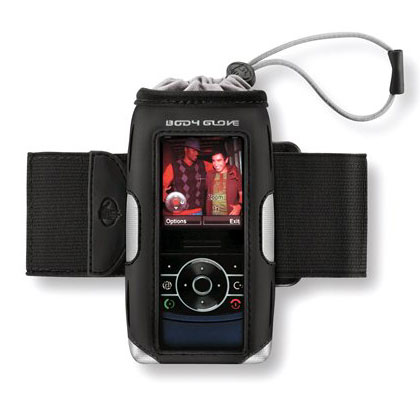
Universal Body Glove Cargo Cellsuit Pouch with Armband


The Body Glove Cargo Universal Case is a sleek and sporty case that carries more than cargo. Just slide your phone inside the pouch and pull the drawstring for a secure fit.

The screen stays visible through the window, while the durable, water-resistant outer case protects your Nokia N95 Classic/8 GB phone from bumps and scratches. For added convenience, this model includes an armband.

Features:
  • Stylish sport look.
  • Screen visible through clear window.
  • Phone held secure with drawstring.
  • Velcro strap can attach to a belt, bag, or purse.
  • Made with water-resistant neoprene.
  • Includes armband.

    Universal Accessory.

    Warranty: 1 Year
    Manufacturer: Body Glove
  • BT Guard v.1.0 for S60 v3 : secure your Bluetooth & save battery

    SymbianGuru released the new software BT Guard, the security software which protects your phone from Bluetooth intrusion and saves battery life.
    Application switches Bluetooth off or to invisible mode automatically, based on the user defined settings. This protects one of the most vulnerable places on the mobile: the Bluetooth connection and saves you from the unwanted Bluetooth request connections and attacks.

    Key Features:
    • BT Guard changes BT automatically after the defined period of time elapses
    • Bluetooth can be turned Off or set to Invisible Mode
    • Application may ask for your permission, this setting is fully customizable (ask always, never, only when an active connection detected)
    • 10 days full functional trial
    More info as well as pdf user manual for Bt Guard can be found on www.symbianguru.com.

    Wednesday, December 19, 2007

    Phone Wallet v.1.0 for S60 v3 : secure & organize your info

    Symbian Guru released the new software Phone Wallet – security software which keeps your confidential info safe and secure and organizes your data in your personal way.

    Phone Wallet secures your personal and confidential information using strong data encryption algorithms, so the data is not available to others and is secure, even after the disk dump of the phone. To access your data you should enter the correct password.

    You may enter any information you need to keep secure, from passwords to the credit card numbers and you can be certain that everything is safe. There are many preinstalled folders and data types with icons. You can easily add or delete folders, records or fields, everything can be set according to customers’ wishes. You can organise data as you wish. There are no limits to numbers of records, fields and folders. You can create as many fields or records as you wish and need.

    To get this application more secure, the autolock function was implemented. After some period of time the application gets locked, for example after some idle time. Also it gets locked in background, for example when you have no time to close the application and should answer the urgent call; application gets closed automatically.

    Key Features:

    · Strong data encryption for your data security with Advanced Encryption Standard (AES)
    · AutoLock function after some time of being idle
    · Application is locked when it goes to background
    · Layout settings for icons and view styles
    · Total flexibility for adding, deleting and editing of folders, records and fields
    · Many data are predefined for you, so the application is ready to use right after install
    · Nice application design

    More info as well as pdf user manual for Phone Wallet can be found on www.symbianguru.com.

    Saturday, December 15, 2007

    Your very own personal translator-N95


    Our great N95, the phone that had almost all the features that you'd wish to have on a smartphone, has just got better by adding yet another feature - and this one beats them all! This is the deal - Nokia has come up with a prototype camera phone application which, among other things, will reportedly make ordering dinner from your favourite foreign restaurant easier.
    Named Point & Find, the app incorporates numerous elements such as image recognition, GPS positioning and artificial intelligence algorithms to find out what you clicked! . Bear in mind though, that the actual working out of what image you may have snapped will be done on your network provider’s server because AI and Image Recognition recquires some serious processing power. This is not to say that the N95 is low on this! Once you have taken your photo the phone will connect to the net and hopes are it will provide the user with a selection of online purchase options, or in the case of say a movie image it will show movie reviews, or whatever it can find up on the net.
    Yet there’s more, Nokia have hopes of designing the concept to include the translation of foreign restaurant menus as well, so if you visit say a French cuisine restaurant where the menu is in French, just whip you mobile out, snap a picture of the menu and get it translated right there on your mobile screen. Apparently Nokia claims the prototype application is presently able to scan and translate 600 Japanese and 9000 Chinese words, still a bit of a way to go then before they cover all the bases, but Hey! It's still a great start!
    Courtesy PhonesReview.

    Wednesday, December 12, 2007

    Nokia Energy Profiler


    Fed up with those battery drinking programs that you've installed lately? Well why don't you un-install them then? Or is it that you can't find which apps are good on mileage and which are not? Fear no more, with the Nokia Energy Profiler you'll be able to get the battery drain for a particular app in real time! Ofcourse it's of particular use to developers, but there's nothign in it that say we can't use it.

    With the help of a Red dot and graph, it will show exactly hoe the app used up your battery.. neat eH?

    Read Here.

    Monday, December 10, 2007

    YouTube yourself on your s60 v3 phone!

    Now this is what I've been waiting for a long,long time - they had promised it with the v21 firmware for the N95, but then they took it back, giving us a v20. But now we can have it without the firmware update thanks to MobiTubia.

    MobiTubia is a Flash Lite video player and YouTube application for the S60 platform. It enables mobile users to access flv clips(read as youtube's videos) using several different methods. Additionally, the application allows users to browse and search for specific content on YouTube right from your mobile making things way easier.

    It is not a browser plugin, but a very nice solution to play YouTube on S60 devices. The application is not available yet, but once it is I'll right up in front to get it! :)

    Here's a video showing it in action


    Yet another MobiTubia video from Symbian-Freak:

    Sunday, December 9, 2007

    The secret of the (almost) lost N95 headset


    Maciek from Chicago recently ran into trouble with his N95 headset when he sold it to his friend - apparently the headset refused to work because of the change in ownership and decided to be out on strike! Of course Maciek and his friend soon found a solution to this problem and in the end all turned out to well or as they say - all's well that ends well..

    Read Maciek's post here.

    Friday, November 30, 2007

    iGo's Power Extender - a must for n95ers

    Ever been in a fix when you thought that you have all the choicest gadgets in the world but not even one outlet to power them from?

    Electricity,Gadgets everywhere,
    But not an ampere to drink?

    Fear not, because with the PowerXtender from iGo(the makers of the Sierra) you'll be able to charge any of your gadgets from anywhere with just a pair of AA batteries.
    The good thing about the PowerXtender is that,like all things iGo, it's extremely portable. You won't have to set apart any space for it or for the powertips either..they are all compact. Speaking of power tips, they are available for almost any device and allows you to charge all of them from a single PowerXtender. If you're using one of iGo's wall outlets, you'll even be able to simultaneously charge many devices at once!
    Costing around 16 bucks,it's a great deal for every N95 user or any other phone for that matter. In this highly mobile world of ours, going out of charge in the middle of the day can be scary.

    Buy it
    here.

    Below is a video of the powerXtender in use.

    Monday, November 19, 2007

    Phone Guardian v.2.0 for S60 v3 released: more security and more thief tracking

    Symbian Guru released the new version 2.0 of Phone Guardian – the security software which helps to protect the phone from theft and unauthorized access.

    New version of Phone Guardian introduces security fixes of the previous version. Phone Guardian has got new SMS commands for instant thief tracking, full lock and turning on and off the siren. The software has been translated in to many languages. Also new security engine was introduced. This engine is invisible for the users, but it allows more easy functional security updates in the future.

    Phone Guardian locks the phone automatically, after SIM change and on receiving of the lock SMS. Phone unlock is possible only using unlock SMS with right password or password entering in the application.

    Phone Guardian allows phone and thief tracking using the SMS with useful information. The Info-SMS contains always the current SIM card and phone number, as well as Cell ID information which allows territorial tracking of the mobile.

    Phone Guardian 2.0 has following new features:

    1. New SMS commands:
    - Full lock: helps you to lock the phone and emits the siren
    - Turn On/Off of the Siren: turns the siren on and off remotely
    - Info SMS: can be requested any time. It sends you info regarding your phone and location
    2. Phone Guardian was translated into new languages, such as French; German; Spanish; Italian; Swedish; Danish; Norwegian; Finnish; Russian; Dutch; Polish; Latvian; Lithuanian; Ukrainian
    3. The error with phone unlock after reboot was fixed
    4. Uninstall now is possible only using the Phone Guardian password
    5. New security engine was introduced which enables further extensions of the software in the near future.

    Phone Guardian 2.0 is free for all existing users, and it really is worth the money!

    Sunday, October 21, 2007

    Results of the Polls are here..

    We had a poll last week focussing on which phones you guys saw in the better perspective - n95, n93i or the 3310..

    The results are a bit strange though. This being a blog most visited by N95 users, I had expected the N95 to win hands on,and that happened too, but what was unexpected was the draw between the N93i and the 3310!! Imagine that!!!

    The scores are
    N95 68%
    N93i 16%
    3310 16%


    Strange is the way the world moves..

    P.S: Vote in da new poll guys!

    Saturday, October 20, 2007

    iGo Sierra - i luv it!!


    Superb setup, excellent feel, slick designing
    albeit a finger-print magnet for a cover, but more importantly - it takes care of
    the N95 typing bug! :)
    And finally I have received the Stowaway Sierra Keyboard from the guys at iGo - the same guys who brought out the iGo Juice 70 and other cool stuff.

    At first glance, the gleaming body itself lets you justify spending your hard-earned bucks on this great device. The external casing comes in a smooth fluid metallic silver that gives it a really slick look(although it turns out to be quite a magnet for finger prints, but hey! who's perfect??)

    Press the button at the middle and it opens up like a book and unfolds into all it's glory..This star performer of ours turns out to be quite different inside..no wonder they said never to judge a book by it's cover! ;)

    The gleaming metal outside gives way to a black matte finish inside while opening up to a 100% full size keyboard, complete with a 5 row keyboard including dedicated numerical keys - all this while managing to weigh a mere 6 oz!! ( i bet all u models out there envy this :D)


    The drivers for the Sierra are available over the air, made availableby iGo. But it sems they haven't updated the their site with the n95drivers - as yet(hope it does come soon).

    The range for this device is very good even though we wouldn't need it... how far away would it be possible for you to sit and read from your tiny mobile screen!

    Of course it is possible to connect the N95 to a TV screen, which when used along with the Sierra would give you a real neat computing experience - whether it's for gaming or surfin' the net or blogging!

    Just make sure you've got a spare AAA battery in case the charge dies out while you're shooting up people in GTA or driving thru in NFS or ..[bated breath]..busy blogging!!

    One of the problems that I've found on the design side of the keyboard is that after some use the "Insert key" on the keyboard which also hot links to the Web Application tends to bend a little to the left side.

    Upon closer inspection, I've put this down to the pressure exerted by the key coming opposite to it when the keyboard is closed - namely the "M" Key. Unlike the other keys, this particular key only comes in contact with half of the Insert/Web button thus possibly deforming the pad on which it rests.

    This problem is in no way to be considered a major one, as it isn't seen easily even if you look for it. Nothing to worry about as the keyboard is still as fantastic as it used to be.. :)

    iGo Stowaway unboxing video here: http://s603rd.blogspot.com/2007/10/sierra-unboksing.html

    Friday, October 19, 2007

    Sierra UnboKSing!

    This here is the unboxing ceremony of the Sierra Bluetooth Keyboard sent to me by iGo - the makers of the original Stowaway portable keyboard.


    I jus love that gleaming mettalic body work, don't you?!

    See the review here: http://s603rd.blogspot.com/2007/10/igo-sierra-i-luv-it.html


    Wednesday, October 17, 2007

    Mobility's iGo BlueTooth StowAway Keyboard


    Guess what? It's finally been announced by Mobility Electronics! The company that produces the iGo line of portable chargers had released the iGo Stowaway Bluetooth Keyboard and in a few days they'll be sending it to me for a review.. This keyboard is a full sized keyboard that folds up into a form that will fit in a shirt pocket and yet duplicates a regular keyboard when opened. It is the same keyboard as the older USB model by ThinkOutside yet loses the cable in favor of Bluetooth. The keyboard is $129.99 and according to the iGo website is in stock and ready to unfold near you.

    See the review here: http://s603rd.blogspot.com/2007/10/igo-sierra-i-luv-it.html

    iGo Stowaway unboxing video here: http://s603rd.blogspot.com/2007/10/sierra-unboksing.html

    Sunday, October 14, 2007

    Device Status of your phone


    Nokia Device Status is a self-diagnosis tool that allows you to collect detailed system information both from your PC and your S60 device. Your current device configuration and phone settings are presented in a detailed summary, which you can use to determine the exact cause, if you run into problems.


    With Nokia Device Status, you can save all the collected information to a file, and you can send the file to customer care services for closer inspection and analysis.


    Collected data from your PC includes:


    ●Operating system
    ●Language of the operating system vs. that of Nokia PC Suite
    ●Version of Nokia PC Suite currently installed on your PC
    ●Drivers required to connect your phone to your PC
    ●Local time zone
    ●Log files created by Nokia PC Suite
    ●Regional and language settings


    Collected data from your phone includes:


    ●Device model
    ●IMEI code of the phone
    ●Device memory and any available memory card
    ●Profiles and themes used on the phone
    ●Locations used to store data on the phone


    After installation, you can access the application both from your phone and from your PC.


    DownLoad it HeRe.


    Courtesy DailyMobile.

    Thursday, October 4, 2007

    Exploiting your Imaging Phone to the max!

    Ever been in the dilema when you think that the Excellent Camera Phone that you have is of no good in your hands?? When you thought that a good cam in the hands of an unproffesional is useless???

    Fear not 'cuz Symbian Freaks Photography Expert Bigley Ling has some advise for you, and i for one vouch that it's excellent! Check out the pics in this blog especially of the n93 and the Vaja cases and you'll see what i mean ;)..

    So what are you waiting for?? Get over here and turn yourself into the photographer that your phone wants you to be!!

    Read it Here!

    Courtesy Symbian-Freak.

    Wednesday, October 3, 2007

    95 vs 93i - The NSeries ShowDown!


    N93i is a N-Gage 2 enabled and is great for gaming because of it's ergonomics (I mean the button orientation and build). As it is we know that the N93i is capable to run the major games like "Creatures of the Deep" and especially "One Who's Next", but we also know that One Who's Next require to use the both hands and it runs in landscape mode. So the N93i is the great multimedia comp for the N-gage 2 platform.

    But unlike the N95, the N93i doesn't have:

    1) Built in GPS Navigator
    2) HSDPA support
    3) 5 Megapixel camera

    4) 3,5 mm jack
    5) and a load of small features that the N95 has, like the FP1 for instance.

    On the other hand we have the N95 which is a great multimedia computer as well. In terms of technology the N95 is way better and much more functional and smarter that N93/N93i, but the major problem with this device is its ergonomics. I mean the button orientation which makes it's difficult to play on. But it does have GPS and HSDPA and lots of other things.Personally if I think for myself I would buy the N95 hoping it will support the N-Gage 2 experience in full, by that I mean if it will run the One Who's Next game and other great upcoming games for N-gage 2 service in the Landscape mode. But I can't yet imagine how to play this games on N95, no actually I can but it will be hard with the number pad closed when I activate the landscape mode. Maybe I'll have to use a keyboard to play these games after connecting the phone to the TV. Then it'll be like a gaming console..Cool!! And guess what guys, i just got a message from Mobility Intl. that they'll be sending in one of their iGo Blueooth StowAway Keyboards for a test drive!! YeaH!!!

    and did i tell you that the
    N95 is based on the great OMAP 2420 chipset with PowerVR enavbled and it's capable to run 3D games just like that?? learn more about it here.
    Right now I'm happy blending these two into my life using the best of both.. :D

    Psst..vote in the poll on the left will ya?

    The Pundit Report

    Search Me