Showing posts with label n95 nam. Show all posts

Monday, March 31, 2008

N95 Kaliedoscope


Nokia N95 is now available in 3 new colors, White, red and blue. But it seems that the new colors is only available in Japan by the provider “SoftBank” :( Lets hope that it doesn’t take to long before the new colors is available world wide :). Check out the covers over here too at another post from dailymobile.

More pictures available at DailyMobile.

Friday, February 22, 2008

Expenses 2.0


SymbianGuru has updated its expense tracking software and released Expenses 2.0. The update has following new features implemented:-
Now application is password protected, and secures your expenses from unauthorised access

- The font and colour of the on screen reports became customizable
- User now can create own expenses categories, for sorting the expenses according to the needs
- Bug with big numbers import was fixed

Expenses for Series 60.3 organizes private and business expenses in quick and easy way. Comprehensible interface, quick but password protected access to
all expenses make Expenses to beloved tool for budget optimization.

Expenses 2.0 for Series 60 3rd edition track all kinds of expenses, create customized on-screen reports and export expenses records into CSV format for
MS Excel.

Expenses for Series 60.3 save your time and save your money, optimizing your budget. It is unbearable tool for home and business finance.

Key Features of Expenses 2.0 include:

1. Customizable list view of all your expenses, also with the personal notes
2. Secure password protection
3. Application options lets user personalize the main page view, report view, all used expenses types, currencies and payment methods
4. When recording a new expense, the most used expenses types will come first in the list to avoid much scrolling
5. Unlimited number of expenses categories can be created for keeping separately different expenses types
6. User can make a personal note to every expense
7. User can get the total of all expenses just with one click
8. Report on screen can be made, with custom data chosen for the certain period and fully customizable report view
9. Easy export MS Excel (universal CSV format)

Wednesday, February 13, 2008

An N95 on Val's Day is a perfect idea

Gifting your girl friend a N95 would be the best gift ever. But whatif you have it with a cute lil' pink housing that comes with a softsmooth finish? Now that would be really something 'cuz she'd know thatyou really put your mind into giving her something nice, rather thanjust spending money on the best in the market. And when her friendssee the pink N95 they're bound to ask about it. nice eh? ;) Did you know that Darla Mack also has a pink one!!

Sunday, February 3, 2008

How to Make Your Cell Phone Battery Last Longer


While many of us now use cell phones everywhere, the primary benefit of cell phones remains their portability - however, so as to get the most out of your phone you need to get the most out of your battery.

Increase Time between Charges
1. Turn the phone off. This is probably the most effective and simplest way of conserving your battery’s power. If you don't plan on answering the phone while you're sleeping or after business hours, just turn it off. Do the same if you are in an area with no reception (such as a subway or remote area) or in a roaming area, since constantly searching for service depletes the battery fairly quickly. Some phones have an automatic power save feature, but it takes about 30 minutes with no service to kick in. By then, much battery power has been used.

2. Stop searching for a signal. When you are in an area with poor or no signal, your phone will constantly look for a better connection, and will use up all your power doing so. This is easily understood if you have ever forgotten to turn off your phone on a flight. The best way to ensure longer battery life is to make sure you have a great signal where you use your phone. If you don't have a perfect signal, get a cell phone repeater which will amplify the signal to provide near perfect reception anywhere.

3. Get the most out of your battery. Switch off the vibrate function on your phone, and use just the ring tone instead. The vibrate function uses up a lot of battery power. Keep the ring tone volume as low as possible.

4. Turn off your phone's back light. The back light is what makes the phone easier to read in bright light or outside. However, the light also uses battery power. If you can get by without it, your battery will last longer. If you have to use the back light, many phones will let you set the amount of time to leave the back light on. Shorten that amount of time. Usually, one or two seconds will be sufficient. Some phones have an ambient light sensor, which can turn off the back light in bright conditions and enable it in darker ones.

5. Avoid using unnecessary features. If you know it will be a while before your phone’s next charge, don’t use the camera or connect to the Internet. Flash photography can drain your battery especially quickly. If your phone has bluetooth capability, disable it when not in use.

6. Keep calls short. This is obvious, but how many times have you heard someone on their cell phone say, "I think my battery’s dying," and then continue their conversation for several minutes? Sometimes, the dying battery is just an excuse to get off the phone (and a good one, at that), but if you really need to conserve the battery, limit your talk time.


Prolong the Life of Your Battery

1. Initialize a new battery. New batteries should be fully charged before their first use to obtain maximum capacity. Nickel-based batteries should be charged for 16 hours initially and run through 2-4 full charge/full discharge cycles, while lithium ion batteries should be charged for about 5-6 hours. Ignore the phone telling you that the battery is full--this is normal but is not accurate if the battery is not initialized.

2. Keep the battery cool. Your battery will last longest if used near room temperature, and nothing wears on a battery like extended exposure to high temperatures. While you can’t control the weather, you can avoid leaving your phone in a hot car or in direct sunlight, and you don’t have to carry your phone in your pocket, where your body heat will raise its temperature. In addition, check the battery while it’s charging. If it seems excessively hot, your charger may be malfunctioning.

3. Charge your battery correctly, in accordance with its type. Most newer cell phones have lithium-ion batteries, while older ones generally have nickel-based batteries. Read the label on the back of the battery or in the technical specifications in the manual to determine which yours is.
* Nickel-based batteries (either NiCd or NiMH) suffer from a phenomenon known as the "memory effect." If you charge the battery partially enough times, eventually the battery "forgets" that it can charge fully. A nickel-based battery suffering from memory effect can be reconditioned, which requires the battery to be completely discharged, then completely recharged (sometimes several times). The appropriate length of time between reconditionings varies. A good rule to follow for nickel-battery cell-phones is to discharge them completely once every two to three weeks, and only when you have a charger available. * Lithium ion batteries, on the other hand, do not suffer from the same memory effect. However, many devices that use lithium batteries have a battery meter, showing the user how much charge the battery has left. Starting with a battery's manufacture at the factory, lithium ions oxidize in the battery, shortening its life. After a certain amount of time, the battery exhibits slightly different electronic properties, which the device can only detect when the battery is discharged. This type of problem is known as a "virtual memory effect" and occurs when your battery meter can show a high charge, then suddenly drop to low charge when the battery is almost dead. Every thirty cumulative cycles, you should discharge lithium ion batteries until the phone gives a low battery warning, then recharge it. If you discharge lithium ion batteries to zero voltage, the internal safety circuit may open. In that case, a normal charger will be inadequate. Reconditioning ensures that the battery meter on a lithium ion cellphone is accurate (although it will not affect actual battery capacity). * Regardless of the battery type, use only a charger rated for your battery, and discontinue use of a charger that causes the battery to heat up excessively.

4. Store batteries properly. If your battery will be out of use for a while, disconnect it from the phone and store it in a cool place (the refrigerator is good, but freezing temperatures do not slow oxidation) and away from metal objects. Ensure that the battery is not exposed to moisture; try putting the battery in an airtight container or bag. Lithium ion batteries are not rated to operate at refrigerated temperatures, so let the battery sit outside the refrigerator for at least an hour before using it again. Lithium ion batteries oxidize least when they are stored at 40% charge. Never store a lithium battery at low voltage. Recharge batteries after storage.

5. Clean the battery contacts on the battery and on the phone. Over time, contacts may accumulate dirt. Clean them with a cotton swab and rubbing alcohol to maximize the efficiency of energy transfer. In addition, if the contacts are two different metals, such as gold and tin, accelerated corrosion known as "fretting" occurs. Cutting the corrosion from fretted contacts often requires solvents, such as acetone or nail polish remover. Be careful: these solvent dissolve plastic, so use a Q-Tip to avoid damaging the battery housing or the phone.

Battery Failure Indicators


* The usable time after recharging is shortened.
* The battery becomes unusually warm during a rechargecycle. * The battery becomes unusually warm during phone use. * The battery case often is swollen. This is detectable by feeling and viewing the inside/phone-side of the battery case. Also, when the battery is placed inside/phone-side down on a flat, smooth surface, it will rock and will sustain a spin motion. The case of a healthy battery is flat and will not sustain a spin motion. * The battery develops a hard spot. This is detectable on the inside/phone-side surface of the battery by gently pinching about the surface between one's fingers.

Tips

* Regardless of how well you care for your battery, it will die eventually. When it does, you may be able to have it refurbished by sending it to the manufacturer or bringing it back to the retailer. If it cannot be refurbished, or if you just want to get a new battery, be sure to recycle it, either by returning it to the manufacturer or retailer, or by bringing it to a recycling center. Most major retail electronics stores have drop-off boxes for recycled phones. * You should not have to turn off your phone to charge it. Most battery chargers deliver more than enough current to power your phone and charge it at the same time. Doing so will not lengthen the charge time, and leaving a phone on allows the user to be aware of its fuel gauge, so that you can remove it when the battery is full. * When using a car charger, do not charge the battery when the inside temperature of your car is hot. Wait until the car has cooled before you plug in the phone.

Note:


* Do not store a lithium battery with a very low charge for a long time, the battery monitor will draw a small current, which might cause a 'deep discharge' which may cause damage to the battery. * Avoid cheap, knockoff chargers as they may cause excessive battery heating. * When buying lithium ion batteries, be aware that oxidation begins at the time of manufacture, not the time of first use. As such, older lithium batteries will have reduced capacity (about 20% per year stored at room temperature). If you buy a battery at a clearance sale price, expect that you will get less life out of the cell phone. * Never dispose of old batteries in the trash. Batteries contain toxic metals, and electronic waste from batteries and other electronic components is becoming a major problem. Improper disposal of toxic batteries is illegal in many jurisdictions.

Friday, January 25, 2008

N95 in pink!

Some real ccol pics of the N95 in pink clothing, i luv it.. reminds of a post that I'd done some time back..
I've included one pic here, you can see the rest of them at Dailymobile.se.

Sunday, January 13, 2008

Koss P9 - perfect for Mobile users on the move


The Koss P9 In-Ear Headphones with Volume Control features a convenient volume control feature that can be easily adjusted on the fly. Lightweight with a comfortable behind-the-head design, these headphones are made to be worn for long periods of time and are perfect for listeners on the go. Compared with the regular headset available with the N95 the Koss P9 offers almost the same output in terms of sound, but the added bonus is that it has much more stylish looks.

One of the other applications that I found for it's side-firing design is that it's more wearable than usual headsets when your on a motorbike - it's design is kind of aerodynamic that there's less chance of the headset falling off when you're at high speed. Moreover the side-firing technology means you're more likely to hear horns and other external sounds from your surroundings - leading to a safer experience. Obviously no one would use Noise Cancelling Phones when on the road - you won't even hear the Traffic Police man's whistle!!


On the other hand it's sound isn't that much of a reason to go for it. It lacks the bass that Koss advertises so much, and the some frequencies are really bad. Upon comparison with the Standard Nokia headset that comes with the N95 - the Koss P9 is somewhat 80% there.

Straight, dual entry 4 foot cord Plug 3.5mm
Impedance 16 ohms
Weight .7 oz.
Sensitivity 100 dB SPL/1mW
Distortion <1.0%
Cost: 9.99$

Saturday, December 29, 2007

ARGH n95 Screen Flip?

I saw this post at the Nokia Forums the other day. It seems someone's N95 has decided to incorporate Samir's rotateMe app all by itself - ending up rather Topsy-Turvy..
This is the post:


nicbh
New User
Posts: 1


Message 1 of 1

Viewed 11 times


Okay my n95 has started flipping the screen upside down (neither of the two regular ways it would go) randomly. Especially if I turn it off and on again. Any suggestions?
29-Dec-2007 02:58 PM


If any of you can help him out, please do so - this is the link.

Nokia Beta Lab's Conversation


Overview

Conversation is a messaging application that allows you to follow your conversations, organized by individual contact. In addition, the application provides an easy way to reply to messages, and continue the conversations.

After installation, the application will appear in your device as an application shortcut, and as a new tab in your Contacts application.

Installation instructions
Your have to install two separate files in the order specified below. Also, we recommend that you use the latest software available for your device.


  1. Install Nokia Internet Services Support Package to the device memory (not to the memory card). Note! If you have Gizmo or Windows Live already installed, you don't need to install this support package.Download (SIS, 730 KB)
  2. Install the compatible version of Conversation application HeRe.
Have a great time with your conversations! ;)


Friday, December 28, 2007

nice..

Nice little video but I saw it a few days too late I guess :( Guess being on the Information Super High Way by itself won't get you anywhere, you need to have an aim.. Anyways here's the video for all of you who'd missed out on it as well...Special thanks to Clement Clarke Moore, and to all of you out there, be safe, be happy, and enjoy life to the full.

Wednesday, December 26, 2007

And we bring to you..

Hey guys and gals! Guess what, Nokia's very own WOM-World is going to send me a N800 next week so that I can spend some time reviewing it. And since I won't be needing my N95 then, I'm going to send it off on a vacation - to the Nokia Care Center - for some rejuvination therapy ;) It seems to be a little out of shape lately, with creaking slides, light leaking sides, and a multimedia button that makes a ticking sound..not to mention the system crashes! They seem to have increased after I updated to v20!! It's been long since I've played with a touch screen..my last touch was a 7710. Anyways, the N800 posts will start rolling in a week, so if anyone has anything that you want me to try out on it, just ask. Ciao!

Coming soon..

Given over here are the most awaited phones among smartphone freaks as of now, and they include the sleek N81-like N96, the elegant E61, and Nokia’s WiMAX phone. The specs put up here may not be what actually does come out, but it will give you an idea of what to hope for. Assuming that they do come out.

1) Nokia N96

Nokia N96 is simply out of our imagination. This phone is specially designed with two keyboards.
The main features of the phone are
• It weighs only 115 grams
• It has 10 GB internal memory
• Has digital speakers
• Has 4 speakers
• 6 mega pixel camera with optic zoom
• Has 3.2 inch screen with 16 million colors
• Bluetooth, Wifi , infrared and USB 2.0
• FM Radio
• Phone is available in two colors
• GPS
• Touch screen
• MP3 and MP4

2) The second upcoming mobile is E61

This phone is a great gadget for communicating through email. The features of Nokia E61 are as follows
• better Email with one touch
• You can view and edit email with quick office and acrobat reader
• Its connectivity speed is very high( 3G)
• You can take the advantage of voice features as VoIP calling and conference calling
• It has 2 mega pixel camera

Nokia’s WiMAX phone in 2008

Nokia had revealed that it will launch WiMAX in 2008. Till now only North America and Europe had wireless Technologies on 3G and 3.5G. In supporting Intel wireless standard Nokia will Motorola and Samsung. Nokia did not mention any details about this product. But this cell phone is going to be very stunning. The only information about this product is that it comes in two styles i.e. mobile and fixed locations. This cell phone is going to be eye catching and outstanding.


Courtesy http://mobilemanic.co.uk

Monday, December 24, 2007

N95 Accelerometer & FlashLite

Watch this video. FlashLite can also do this with the help of N95 Accelerometer APIs. It's been created and edited by Abhijit and Ganesh and Debashish Paul and has been hosted at http://designtraffic.blogspot.com


Friday, December 21, 2007

N95 Popcorn Magic!

It comes buttered too! but that's beside the point. But I should ask you to not try this at home! Not because it's dangerous or anything, but because the pop corn may get into your slider which could make it all squeaky like! ;)

Thursday, December 20, 2007

NGage Name Registration Open!


The guys at NGage have opened up the Name Registration Counter over there so that you can register your player name mow before someone else beats you to it. Guess the game has already begun!

Reserve a Player Name HeRe!

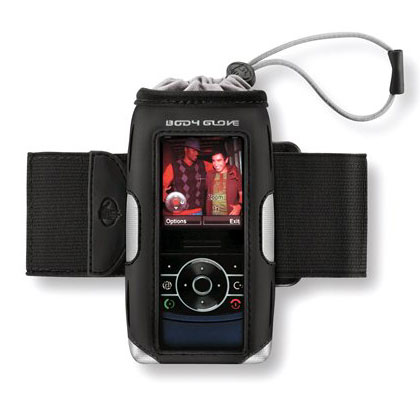
Universal Body Glove Cargo Cellsuit Pouch with Armband


The Body Glove Cargo Universal Case is a sleek and sporty case that carries more than cargo. Just slide your phone inside the pouch and pull the drawstring for a secure fit.

The screen stays visible through the window, while the durable, water-resistant outer case protects your Nokia N95 Classic/8 GB phone from bumps and scratches. For added convenience, this model includes an armband.

Features:
  • Stylish sport look.
  • Screen visible through clear window.
  • Phone held secure with drawstring.
  • Velcro strap can attach to a belt, bag, or purse.
  • Made with water-resistant neoprene.
  • Includes armband.

    Universal Accessory.

    Warranty: 1 Year
    Manufacturer: Body Glove
  • BT Guard v.1.0 for S60 v3 : secure your Bluetooth & save battery

    SymbianGuru released the new software BT Guard, the security software which protects your phone from Bluetooth intrusion and saves battery life.
    Application switches Bluetooth off or to invisible mode automatically, based on the user defined settings. This protects one of the most vulnerable places on the mobile: the Bluetooth connection and saves you from the unwanted Bluetooth request connections and attacks.

    Key Features:
    • BT Guard changes BT automatically after the defined period of time elapses
    • Bluetooth can be turned Off or set to Invisible Mode
    • Application may ask for your permission, this setting is fully customizable (ask always, never, only when an active connection detected)
    • 10 days full functional trial
    More info as well as pdf user manual for Bt Guard can be found on www.symbianguru.com.

    Monday, December 17, 2007

    rotateMe v2.0 Beta 5 released

    Samir is going to publish the rotateMe v2.0 Beta 5 for the public due to the humungous amounts of e-mails that he recieved recquesting him to do so.

    There are lors of new features in this Version of his great app which includes(at last!) a feature to hide the app from the task manager. Move over here to get more info and click here to get the app! Remember though that the app is unsigned, you'll have to sign it yourself.

    Saturday, December 15, 2007

    Your very own personal translator-N95


    Our great N95, the phone that had almost all the features that you'd wish to have on a smartphone, has just got better by adding yet another feature - and this one beats them all! This is the deal - Nokia has come up with a prototype camera phone application which, among other things, will reportedly make ordering dinner from your favourite foreign restaurant easier.
    Named Point & Find, the app incorporates numerous elements such as image recognition, GPS positioning and artificial intelligence algorithms to find out what you clicked! . Bear in mind though, that the actual working out of what image you may have snapped will be done on your network provider’s server because AI and Image Recognition recquires some serious processing power. This is not to say that the N95 is low on this! Once you have taken your photo the phone will connect to the net and hopes are it will provide the user with a selection of online purchase options, or in the case of say a movie image it will show movie reviews, or whatever it can find up on the net.
    Yet there’s more, Nokia have hopes of designing the concept to include the translation of foreign restaurant menus as well, so if you visit say a French cuisine restaurant where the menu is in French, just whip you mobile out, snap a picture of the menu and get it translated right there on your mobile screen. Apparently Nokia claims the prototype application is presently able to scan and translate 600 Japanese and 9000 Chinese words, still a bit of a way to go then before they cover all the bases, but Hey! It's still a great start!
    Courtesy PhonesReview.

    Wednesday, December 12, 2007

    Nokia Energy Profiler


    Fed up with those battery drinking programs that you've installed lately? Well why don't you un-install them then? Or is it that you can't find which apps are good on mileage and which are not? Fear no more, with the Nokia Energy Profiler you'll be able to get the battery drain for a particular app in real time! Ofcourse it's of particular use to developers, but there's nothign in it that say we can't use it.

    With the help of a Red dot and graph, it will show exactly hoe the app used up your battery.. neat eH?

    Read Here.

    Monday, December 10, 2007

    YouTube yourself on your s60 v3 phone!

    Now this is what I've been waiting for a long,long time - they had promised it with the v21 firmware for the N95, but then they took it back, giving us a v20. But now we can have it without the firmware update thanks to MobiTubia.

    MobiTubia is a Flash Lite video player and YouTube application for the S60 platform. It enables mobile users to access flv clips(read as youtube's videos) using several different methods. Additionally, the application allows users to browse and search for specific content on YouTube right from your mobile making things way easier.

    It is not a browser plugin, but a very nice solution to play YouTube on S60 devices. The application is not available yet, but once it is I'll right up in front to get it! :)

    Here's a video showing it in action


    Yet another MobiTubia video from Symbian-Freak:

    The Pundit Report

    Search Me